A Complete Guide to Obtaining a Compliant US Passport Photo in 2026
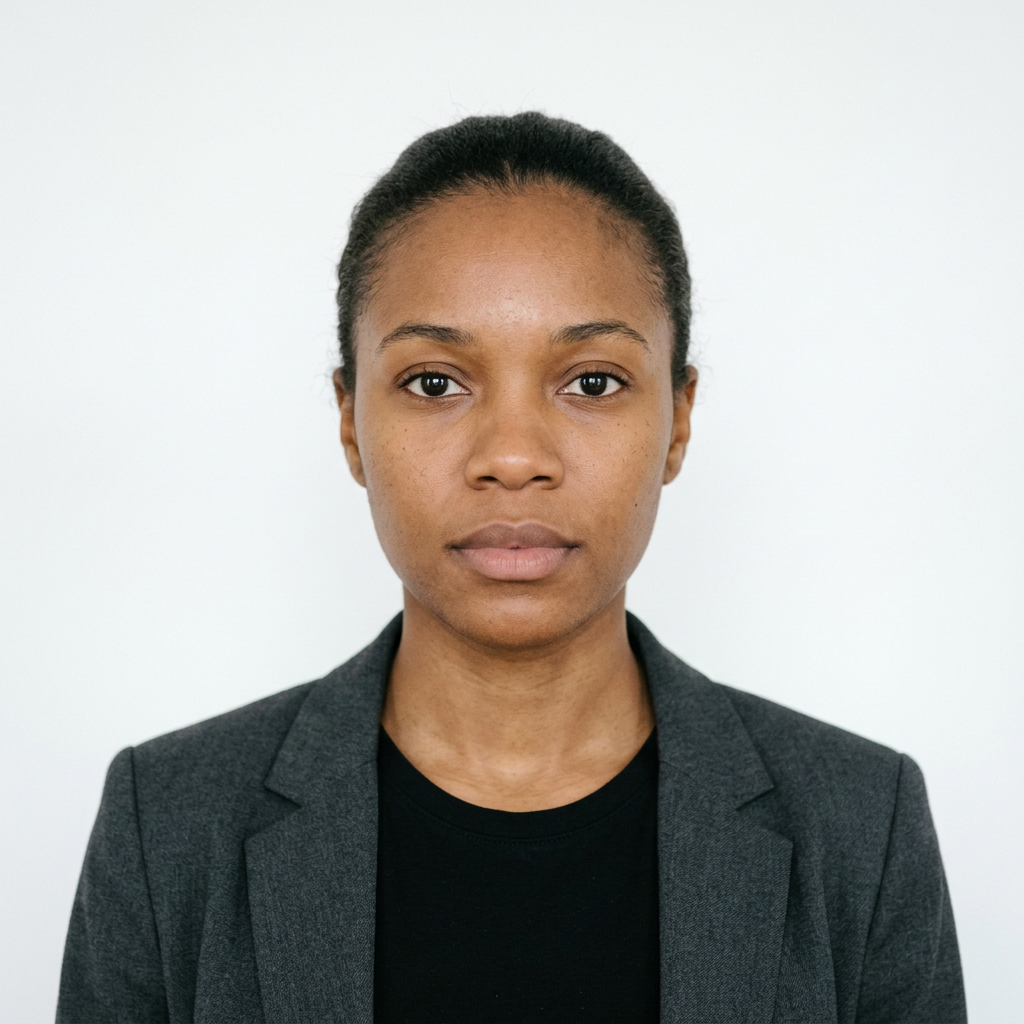
Navigating the specific regulations for a us passport photo is a critical step in ensuring your travel documents are processed without delay. Whether you are applying for a new passport or renewing an existing one, the image you provide must adhere to strict biometric standards established by the U.S. Department of State to be considered valid for international identification.

Quick Summary
A compliant us passport photo must be a high-resolution, recent color image measuring exactly 2 x 2 inches (51 x 51 mm) with a plain white or off-white background. The subject must maintain a neutral facial expression or a natural smile with both eyes open, facing the camera directly.
- Dimensions: 2 x 2 inches (51 x 51 mm).
- Background: Uniform white or off-white, no shadows.
- Head Position: Centered, between 1 and 1 3/8 inches from chin to top of head.
- Recency: Taken within the last 6 months to reflect your current appearance.
Table of Contents
- Quick Summary
- Understanding American Passport Photo Requirements
- Standardizing American Passport Photo Size
- Technical Specifications for Application Photo Passport
- Common Pitfalls and How to Avoid Them
- Tips for Capturing Infant and Child Photos
- FAQ
- Recommended Reads
Understanding American Passport Photo Requirements
The Department of State enforces rigorous american passport photo requirements to facilitate facial recognition technology and secure identification. Unlike casual photography, these standards prioritize consistency, lighting, and geometric alignment. Failure to meet these criteria often results in application rejection, which forces applicants to restart the process and submit new, compliant images.
The most important rule is the "neutrality" of the image. The applicant must face the lens squarely, avoiding any tilting of the head or unusual angles. Glasses are strictly prohibited in passport photos as of 2016, and accessories such as hats or head coverings must be removed unless a signed statement is provided verifying they are worn for religious or medical purposes. Even in such cases, the covering must not obscure the hairline or create shadows on the face.
Standardizing American Passport Photo Size
The mandated american passport photo size is non-negotiable: the print must be exactly 2 by 2 inches (51 by 51 mm). Within this square frame, the subject’s head must occupy a specific vertical range. The height of the head, measured from the bottom of the chin to the top of the crown, must be between 1 inch and 1 3/8 inches (25 mm to 35 mm).
Maintaining these proportions is essential for the automated scanning systems used by government agencies. If the image is cropped incorrectly or the head size falls outside the permitted range, the photo will likely be rejected for technical non-compliance. When printing, use high-quality matte or glossy photo paper; avoid textured paper or digital inkjet prints that exhibit visible scanning lines or pixelation, as these can compromise the integrity of the submitted document.
Technical Specifications for Application Photo Passport
When preparing an application photo passport, digital file quality is just as important as physical print dimensions. If you are submitting a digital file for an online renewal process, ensure the file is in JPEG format with a minimum resolution of 600 x 600 pixels. The file size should typically be under 240 KB to meet upload requirements.
Proper lighting is another technical pillar. You must ensure the environment is evenly lit to prevent shadows on the face or behind the head against the background. Using a natural, flat light source helps highlight facial features accurately, which is crucial for biometric verification. Parents and travelers can explore resources like the us baby passport photo guide for specific technical adjustments regarding infants, who often require different stabilization techniques than adults.
Pro Tip: When taking your photo at home, use a high-resolution camera rather than a standard web camera. Position the camera at eye level and stand approximately 4 to 5 feet away from the lens to minimize distortion of facial features, which can occur if the camera is held too close.
Common Pitfalls and How to Avoid Them
Many passport applications are paused because of "busy" backgrounds. A plain white wall is often sufficient, but shadows cast by the subject against that wall can lead to immediate rejection. Always ensure the subject is standing slightly away from the wall to eliminate shadows, and use soft, diffused lighting to ensure an even tone across the face and the background.
Another frequent mistake involves the quality of the photo paper. Some home printers, particularly those using older ink cartridges or low-quality paper, produce images that look "streaky" or muted. If your printer cannot produce a sharp, high-contrast image, it is safer to take a high-quality digital image and have it printed at a professional retail kiosk or utilize specialized baby passport photo services to ensure the final output matches government specifications.
Tips for Capturing Infant and Child Photos
Photographing infants for a passport is notoriously difficult because they cannot hold their heads upright or maintain a neutral expression. However, the requirement for a plain white background still applies. A simple solution is to lay the baby on a white sheet or blanket on a flat surface, ensuring the lighting is bright and shadows are minimized. Be sure that no hands or support items are visible in the frame.
For children who are slightly older, it helps to keep the camera at their eye level. Since children may squirm, take several burst-mode photos to increase your chances of capturing a clear, centered image. You may find it helpful to consult a uk baby passport photo resource if you are navigating international requirements, as many global standards share similar foundational principles regarding background and facial obstruction.
FAQ
- Can I wear glasses in my US passport photo? No. As of November 1, 2016, you must remove your glasses for your passport photo. If you cannot remove them for medical reasons, you must provide a signed doctor's note with your application.
- What should I do if my photo has a shadow behind me? Shadows are a common reason for rejection. To avoid them, step away from the wall you are standing in front of. If you are at home, try moving closer to a window or using a light source that distributes illumination evenly across your face.
- How recent does the photo need to be? The photo must be taken within the last 6 months to accurately reflect your current appearance. If you have undergone significant changes, such as major facial surgery or significant weight loss/gain, you should take a new photo.
- Can I smile in my passport photo? Yes, you may have a natural smile. However, you must keep both eyes open and your mouth closed. Avoid exaggerated expressions, as these can interfere with biometric software.