Baby Passport Maker vs Costco Photo Lab
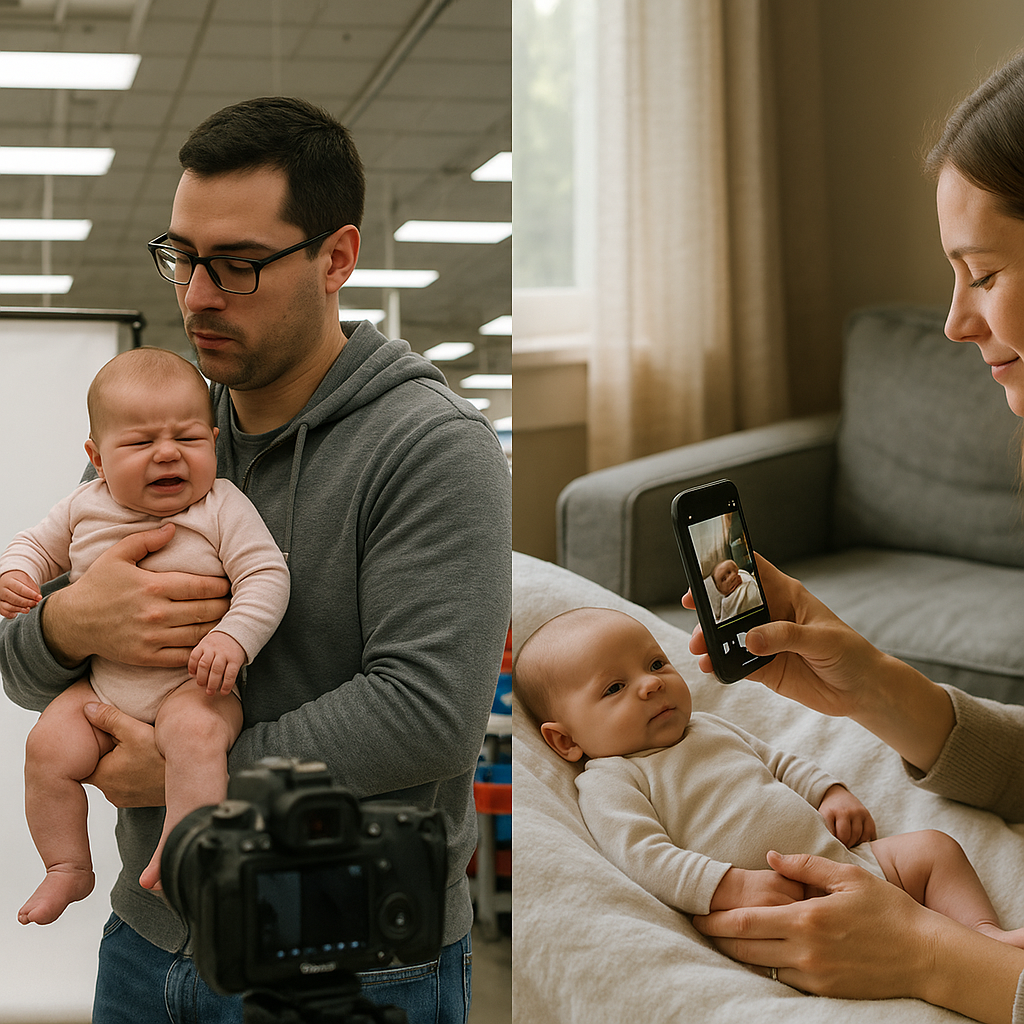
Getting a passport photo for a baby sounds simple. It isn’t.
Anyone who has ever tried to photograph an infant knows the truth - babies don’t pose, don’t sit still, and definitely don’t care about government photo requirements. One minute they’re smiling like an angel, the next they’re blinking, turning away, or attempting a full-body twist worthy of a yoga instructor.
So when it comes to choosing between Baby Passport Maker vs Costco Photo Lab, the decision matters more than most parents expect. This isn’t just about snapping a picture. It’s about convenience, compliance, cost, and sanity.
Let’s break it down.
The Core Difference at a Glance
Here’s the short version:
- Costco Photo Lab - in-store service, traditional setup, general passport photos.
- BabyPassportMaker.com - online, baby-focused, designed specifically for infant passport compliance.
Sounds straightforward, right? Not quite.
The difference isn’t just where the photo gets taken. It’s how the entire experience unfolds.
Convenience: Leaving the House vs Staying Home
Costco Photo Lab Experience
With Costco, parents pack up the diaper bag, buckle the car seat, navigate traffic, find parking, wait in line, and hope the baby cooperates when it’s finally their turn.
Now imagine trying to get a newborn to sit upright against a plain white background under fluorescent lights. If you ask most parents, that’s like trying to convince a cat to enjoy bath time.
And if the baby cries? Blinks? Turns their head?
Retake.
Sometimes multiple retakes.
BabyPassportMaker.com Experience
With BabyPassportMaker.com, the entire process happens at home.
Parents take a photo using their smartphone - yes, the same device already overflowing with baby pictures - and upload it. The service adjusts sizing, ensures background compliance, and prepares the file according to official passport photo standards.
No car rides. No public meltdowns. No awkward lighting.
Just home. Calm. Familiar surroundings.
For many families, that difference alone is everything.
Accuracy and Compliance
Here’s where things get serious.
Passport agencies are strict. For adults, it’s already particular. For infants? It’s even trickier because babies can’t follow instructions like “chin down” or “look straight ahead.”
Costco Photo Lab Compliance
Costco employees are trained to take passport photos. But they aren’t infant photography specialists. Their setup works well for cooperative adults. Babies, though, require a different approach.
Common issues include:
- Shadows behind the head
- Improper head positioning
- Visible hands of supporting adults
- Incorrect facial expression
If the photo doesn’t meet government standards, the application can be rejected. That means delays. And more stress.
BabyPassportMaker.com Compliance
This service is specifically built for baby passport photos. That specialization matters.
The system checks:
- Head size and placement
- Background clarity and color
- Proper cropping dimensions
- Overall compliance with U.S. passport guidelines
It’s like having a passport photo editor in your pocket.
Honestly, specialization wins here. General photo labs handle everything from holiday cards to graduation portraits. BabyPassportMaker.com focuses on one thing - infant passport photos - and does it well.
Cost Comparison
Let’s talk money.
Costco passport photos typically run at a set in-store rate. It’s affordable, especially if someone already has a membership. But that price assumes success in one visit.
What about the hidden costs?
- Fuel for driving
- Time spent waiting
- Potential retakes
- Missed work hours
Time, especially for new parents, is currency.
BabyPassportMaker.com eliminates transportation costs entirely. Parents use a phone they already own. The fee covers digital preparation and compliance adjustments.
When factoring convenience and reduced rejection risk, many families find the online option surprisingly efficient financially.
Speed and Turnaround Time
Speed matters when travel plans are looming.
Costco Timing
Photos are usually printed the same day. That’s a plus. Walk in, walk out with physical copies.
But scheduling around store hours can be limiting. Add a fussy infant to the mix, and timing becomes unpredictable.
BabyPassportMaker.com Timing
Online processing is fast. Parents upload, receive a compliant digital file, and print at home or a local printer.
No store hours. No lines.
Midnight upload while the baby sleeps? Totally possible.
That flexibility feels modern. Because it is.
Stress Level - The Hidden Factor
Here’s something few comparison articles mention: emotional bandwidth.
Taking a newborn into a public setting for a precise photo session can feel like preparing for a mini expedition. Diapers packed. Feeding scheduled. Nap timing calculated down to the minute.
And if the baby decides today is not photo day?
Everything unravels.
At home, parents control the environment. Lighting can be adjusted. Attempts can happen gradually. There’s room for patience.
If the first photo doesn’t work, take another. And another. No audience watching. No pressure.
That difference isn’t small. It’s psychological relief.
Quality Control
Quality isn’t just about resolution. It’s about meeting strict biometric criteria.
Costco provides printed photos immediately, but once printed, corrections mean starting over.
BabyPassportMaker.com delivers a digital file that can be reviewed before printing. Adjustments are part of the process.
Think of it like tailoring a suit versus buying one off the rack. Both can work. One is more customized.
Technology Advantage
Smartphones today rival professional cameras from a decade ago. High resolution, natural lighting, instant review.
The online model leverages that reality.
Instead of relying on fixed studio lighting inside a retail store, parents can use soft daylight near a window. The result often looks more natural.
And let’s be honest - babies photograph better in familiar spaces.
Pros and Cons Breakdown
Costco Photo Lab Pros
- Immediate printed copies
- In-person assistance
- Established retail brand
Costco Photo Lab Cons
- Requires travel
- Less specialized for infants
- Dependent on store hours
BabyPassportMaker.com Pros
- Fully online and convenient
- Designed specifically for baby passport photos
- Flexible timing
- Reduced stress environment
BabyPassportMaker.com Cons
- Requires basic smartphone photo skills
- Digital-first approach may feel unfamiliar to some
Which One Makes More Sense?
If someone values traditional, in-person service and already shops at Costco regularly, their photo lab might feel comfortable.
But for parents prioritizing ease, infant-focused compliance, and flexibility, BabyPassportMaker.com stands out.
Here’s the hot take: baby passport photos are not just smaller adult photos. They’re a different category entirely.
And services designed specifically for that niche often outperform general solutions.
Final Thoughts on Baby Passport Maker vs Costco Photo Lab
Traveling with a baby already involves logistics that could rival a small military operation. Why add more friction?
Both options can produce acceptable passport photos. That’s true.
But one requires packing up and hoping for cooperation under store lights. The other allows multiple attempts in pajamas, in a quiet living room, with no ticking clock.
When weighing Baby Passport Maker vs Costco Photo Lab, the decision often comes down to control.
Control over timing. Environment. Retakes. Comfort.
For many modern families, that control makes all the difference.
Because when it comes to babies, flexibility isn’t a luxury - it’s survival.