Baby Passport Photo Resolution and DPI Requirements
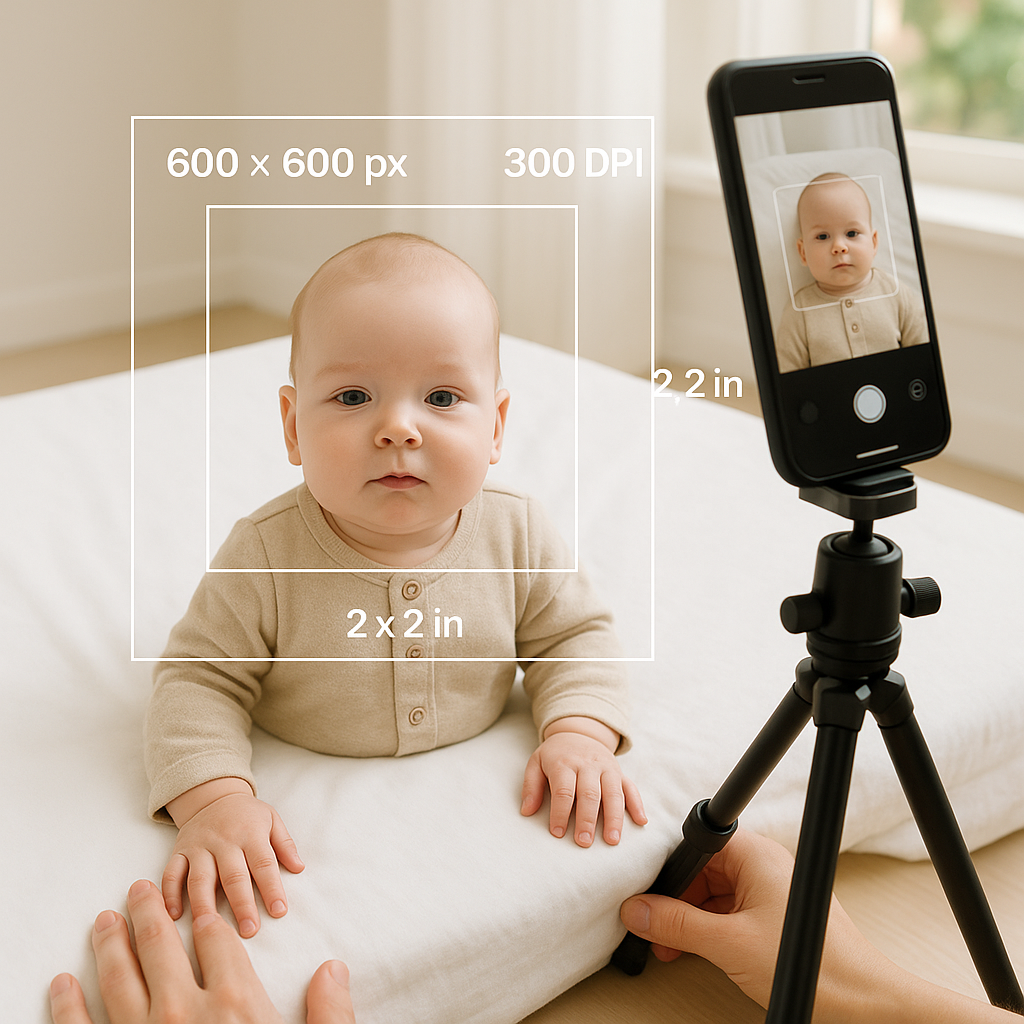
Getting a baby passport photo sounds simple. Until it isn’t. Parents quickly discover that official guidelines read like a technical manual - resolution, DPI, pixel dimensions, lighting ratios. It can feel like trying to assemble furniture without instructions. And when the subject is a wiggly six-month-old? Things get real, fast. This guide breaks down baby passport photo resolution and DPI requirements in plain English. No jargon overload. No robotic explanations. Just what matters, why it matters, and how to get it right the first time. ## Why Resolution and DPI Actually Matter Here’s the thing - governments don’t reject photos for fun. They reject them because facial recognition systems are picky. Very picky. Resolution determines how clear the image looks. DPI - dots per inch - controls print quality. Together, they decide whether your baby’s tiny facial features are crisp enough for biometric scanning. Think of resolution like the number of tiles in a mosaic. The more tiles, the clearer the picture. DPI? That’s how tightly those tiles are packed when printed. Low resolution equals blurry cheeks. Wrong DPI equals poor print output. And blurry plus poor print equals rejection. Sounds dramatic? It happens every day. ## Standard Baby Passport Photo Size Requirements Before diving deeper into DPI and pixel math, let’s clarify the basic photo size most countries require. ### For U.S. Baby Passport Photos - 2 x 2 inches (51 x 51 mm) - Head size between 1 inch and 1 3/8 inches from chin to top of head - Plain white or off-white background - No shadows - Eyes open (if possible - infants get slight flexibility) Other countries have slightly different dimensions, but most follow a similar structure. Now let’s talk about the part that confuses almost everyone. ## Baby Passport Photo Resolution Requirements Resolution refers to pixel dimensions - the width and height of the image in digital form. For U.S. applications submitted online: - Minimum: 600 x 600 pixels - Maximum: 1200 x 1200 pixels - Square aspect ratio The image must also: - Be in color - Be in JPEG format - Not exceed 240 KB in file size (for online uploads) That’s the technical checklist. But here’s a hot take - bigger isn’t always better. Uploading a 4000 x 4000 image won’t make it more “official.” It just makes it non-compliant. Keep it within the required range. Clean. Sharp. Balanced. ## Understanding DPI for Baby Passport Photos DPI stands for dots per inch. It affects how the image prints. Most passport authorities require: - 300 DPI for printed photos Why 300? Because that’s the industry standard for high-quality photo printing. Lower than that and the image can appear grainy. Higher? It usually doesn’t make a visible difference but may create formatting issues. If someone prints a 2 x 2 inch image at 300 DPI, the resulting resolution should be: - 600 x 600 pixels See how that lines up perfectly with the digital minimum requirement? Not a coincidence. ### Quick DPI Formula To calculate resolution for printing: Width in inches x DPI = Required pixel width Height in inches x DPI = Required pixel height So: 2 inches x 300 DPI = 600 pixels Simple math. Big impact. ## Common Mistakes Parents Make Even well-meaning parents trip over technical details. It’s understandable. Babies don’t exactly pose on command. Here are frequent errors: 1. Using low-resolution phone screenshots 2. Cropping too tightly or too loosely 3. Printing at 72 DPI instead of 300 4. Submitting compressed social media images 5. Ignoring background brightness Social media platforms compress files aggressively. That adorable snapshot downloaded from Instagram? Probably unusable for official documents. And yes, printing at 72 DPI is a classic mistake. On a screen it looks fine. On paper? Muddy. ## Lighting and Clarity - The Hidden Resolution Boosters Resolution numbers alone don’t guarantee approval. Lighting plays a massive role. Imagine shining a flashlight through fog. Even a high-resolution camera won’t fix that haze. The same goes for shadows on your baby’s face. For best results: - Use natural daylight - Avoid direct flash - Eliminate shadows behind the head - Ensure even lighting across both cheeks The clearer the facial features, the smoother the application process. ## Digital vs Printed Baby Passport Photos There’s a difference between uploading a digital file and submitting printed copies. ### For Online Applications Focus on: - Correct pixel dimensions - Proper file size - Square crop - Neutral expression ### For Printed Submissions Double-check: - 2 x 2 inch size exactly - 300 DPI print setting - High-quality photo paper - No ink streaks or smudges Printing at home can work - but only if the printer is capable of true 300 DPI photo output. Office paper won’t cut it. ## How to Check Photo Resolution and DPI Many parents don’t realize how easy it is to verify these details. On most computers: 1. Right-click the image file 2. Select "Properties" or "Get Info" 3. Check pixel dimensions 4. Look for resolution details (DPI) On smartphones, editing apps often display this information under image settings. If the numbers don’t match requirements, resizing must be done carefully. Stretching a small image upward reduces clarity. Shrinking a massive one? Usually safe. ## Why Professional Tools Make a Difference Honestly, trying to manually crop and resize while holding a squirming infant feels like juggling water balloons. That’s where specialized services step in. BabyPassportMaker.com simplifies the entire process by automatically adjusting: - Pixel dimensions - DPI settings - Background correction - Proper head positioning - File formatting Instead of guessing whether the photo meets government standards, parents get a ready-to-submit image formatted correctly from the start. It’s not about convenience alone. It’s about reducing rejection risk. ## Baby Passport Photo Background and Framing Rules Resolution gets the spotlight, but framing is equally important. The baby must: - Face the camera directly - Have a neutral expression - Keep eyes open if possible - Avoid visible hands from parents - Have no visible toys or props White background means truly white. Not beige. Not textured wallpaper. Plain. And yes, laying a baby on a white sheet works - if the lighting is even and shadows are removed. ## File Size Limits - The Overlooked Detail Here’s a curveball many don’t expect. Even if resolution and DPI are correct, file size can cause issues. For U.S. online passport applications: - Maximum file size: 240 KB That’s relatively small. High-resolution images must be compressed properly without sacrificing clarity. It’s a balancing act. Like packing a suitcase - everything needs to fit without wrinkling the essentials. ## Quick Checklist for Baby Passport Photo Approval Before submitting, review this list: - 600 x 600 to 1200 x 1200 pixels - 2 x 2 inch printed size - 300 DPI for print - JPEG format - Under 240 KB (for online upload) - Plain white background - No shadows - Clear facial visibility If every box is checked, approval chances increase dramatically. ## Final Thoughts on Baby Passport Photo Resolution Precision matters. Not because agencies enjoy nitpicking, but because biometric systems rely on consistent standards. Resolution ensures clarity. DPI guarantees print quality. Proper formatting prevents technical rejection. When parents understand these details, the process stops feeling mysterious. It becomes manageable. Structured. Predictable. And that’s the real goal - fewer resubmissions, fewer delays, fewer headaches. Because traveling with a baby is already an adventure. The paperwork shouldn’t be.