DIY Passport Photo Studio for Parents at Home
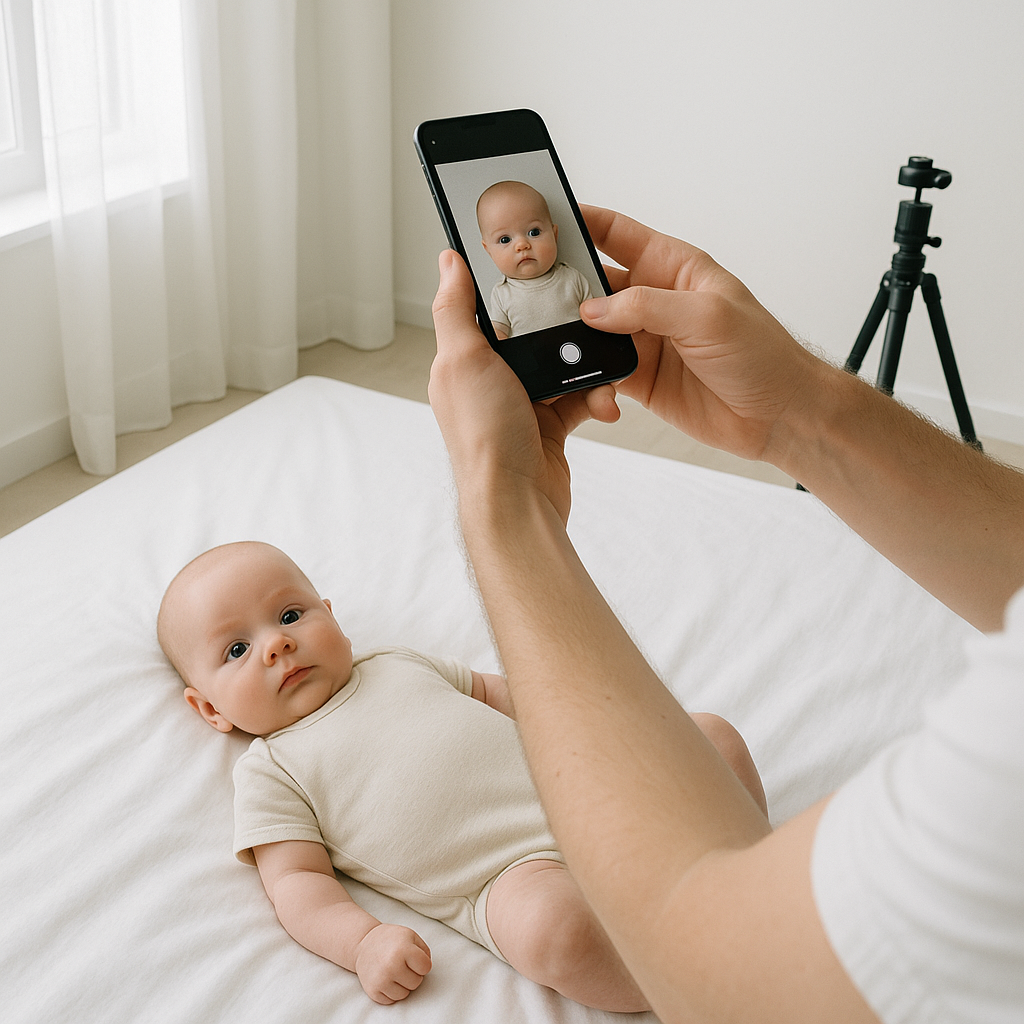
Taking a baby’s passport photo at home sounds simple. Until it isn’t.
One minute the child is smiling like an angel. The next? Tears. Wiggles. A sudden fascination with their own toes. And somehow every photo ends up blurry, shadowy, or slightly… illegal-looking.
Here’s the truth - creating a DIY passport photo studio at home is absolutely doable. Parents just need the right setup, a bit of patience, and a few insider tricks. When done right, it saves time, money, and a trip to a crowded photo booth where everyone is judging the chaos.
This guide walks through exactly how parents can create passport photos at home that meet official requirements - without losing their sanity.
Why Create a DIY Passport Photo Studio at Home?
Let’s be honest. Taking a baby to a studio for passport photos can feel like preparing for battle. Diaper bag packed. Backup outfit. Emergency snacks. All for a two-minute photo.
Honestly, many professional studios struggle with infant passport photos anyway. Babies can’t sit straight. They don’t follow instructions. And they definitely don’t understand “neutral expression.”
So why not control the environment?
Benefits of Taking Passport Photos at Home
- No scheduling appointments
- No waiting in line
- No stress from unfamiliar surroundings
- Unlimited retakes
- Cost savings
Sounds better already, right?
What You Actually Need for a Home Passport Photo Setup
Good news - parents don’t need a professional camera or studio lighting. In fact, most modern smartphones are more than capable.
1. A Plain White Background
This is non-negotiable. Passport photo requirements demand a plain white or off-white background. No patterns. No shadows. No texture.
A simple white wall works beautifully. No white wall? Use a clean white sheet. Iron it if necessary. Wrinkles create shadows, and shadows cause rejections.
Think of the background like a blank canvas. The baby is the artwork. Nothing else should compete.
2. Natural Lighting
Lighting makes or breaks a passport photo.
Position the baby facing a window during daytime. Soft, indirect sunlight is ideal. Harsh overhead lighting? Avoid it. Direct flash? Usually too strong.
If shadows appear behind the head, adjust the distance from the wall slightly. It’s a small tweak that makes a huge difference.
3. A Smartphone or Camera
Most smartphones from the past five years are more than sufficient. Use the rear camera for better quality. Hold it steady. Even better - use a tripod if available.
Blurry photos get rejected. And nothing frustrates parents more than resubmitting paperwork because of avoidable blur.
4. Patience - Lots of It
Here’s a hot take: patience matters more than equipment.
Babies are unpredictable. Expect to take 20 or 30 photos to get one usable image. That’s normal. Completely normal.
How to Position a Baby for Passport Photos
This part trips up many parents.
Unlike adults, infants don’t sit upright easily. But there are simple solutions.
For Newborns
- Lay the baby flat on a white sheet
- Ensure the head is straight and centered
- Stand directly above to take the photo
- Make sure no hands are visible near the face
Pro tip - place a rolled towel under the sheet to gently support the head if needed.
For Older Babies
- Seat them in a car seat covered with a white blanket
- Ensure the head is straight and facing forward
- Capture the image at eye level
The key rule? The baby’s face must be fully visible. Eyes open. Mouth closed if possible. No pacifiers. No toys. No parent hands sneaking into frame.
Common Passport Photo Mistakes Parents Make
If you ask me, most rejections happen because of tiny technical errors. Not because the baby wasn’t “cute enough.”
Avoid These Issues:
- Shadows on the background
- Red-eye from flash
- Head tilted sideways
- Smiling widely or open mouth
- Clothing blending into the white background
Dress the baby in darker clothing for contrast. Skip hats and headbands. Even adorable ones. Yes, it hurts. But rules are rules.
Editing and Sizing - Where Most Parents Get Stuck
Taking the photo is only half the battle. The dimensions must meet strict government guidelines. Specific head size. Proper spacing. Exact proportions.
Trying to crop manually can feel like measuring with a ruler while blindfolded.
This is where tools like BabyPassportMaker.com come in handy. The service adjusts the photo automatically to meet official passport requirements. It handles sizing, background refinement, and formatting so parents don’t have to second-guess every pixel.
Honestly, using a dedicated baby passport photo service removes the technical stress. Parents can focus on capturing a good image - and let the platform handle compliance.
Step-by-Step Guide to Creating a Baby Passport Photo at Home
Let’s break it down clearly.
Step 1 - Set Up the Background
Choose a bright room with natural light. Smooth out the white sheet or use a clean wall.
Step 2 - Dress the Baby Properly
Select darker clothing. Avoid white outfits that blend into the background.
Step 3 - Position Carefully
Ensure the head is straight, centered, and facing forward. No tilting.
Step 4 - Capture Multiple Photos
Take plenty of shots. Small movements can ruin alignment.
Step 5 - Upload and Adjust
Use a passport photo tool to crop and format according to official standards.
Step 6 - Double Check Requirements
Review country-specific guidelines before submission.
It sounds like a lot written out. In practice? The whole process can take less than 20 minutes once everything is ready.
Lighting Tips That Make a Big Difference
Lighting deserves extra attention because it’s the silent dealbreaker.
- Shoot during mid-morning or early afternoon
- Avoid direct overhead lights
- Position baby about two feet from background
- Stand directly in front - not above at an angle unless newborn lying down
Imagine light like water. It should wash gently over the face, not crash like a wave creating harsh shadows.
What About Facial Expressions?
This one worries parents the most.
Babies do not need a perfectly serious expression. They just need a neutral face. Eyes open. No exaggerated smile. No crying.
Quick trick - make a soft sound to grab attention right before snapping the photo. Timing matters. A fraction of a second can mean the difference between usable and unusable.
Is DIY Really Worth It?
Some parents wonder if the savings are worth the effort.
Here’s the honest perspective: for many families, yes. Especially when dealing with infants under one year old. A calm home environment often produces better results than a rushed studio visit.
Plus, having control feels empowering. Instead of hoping a stranger captures the right moment, parents can take their time.
And if the first attempt fails? Try again tomorrow. No appointment rescheduling. No additional fees.
Final Thoughts on Building a DIY Passport Photo Studio
Creating a DIY passport photo studio at home is less about fancy gear and more about smart setup. Clean background. Good lighting. Proper positioning. Careful editing.
That’s it.
Parents who approach the process calmly - and use reliable tools to handle formatting - dramatically increase approval chances.
Is it always perfectly smooth? Of course not. Babies rarely cooperate on command.
But with preparation and a little persistence, that tiny passport photo becomes just another small parenting victory. And honestly, those little wins feel pretty great.