How to take baby passport photo with white background DIY
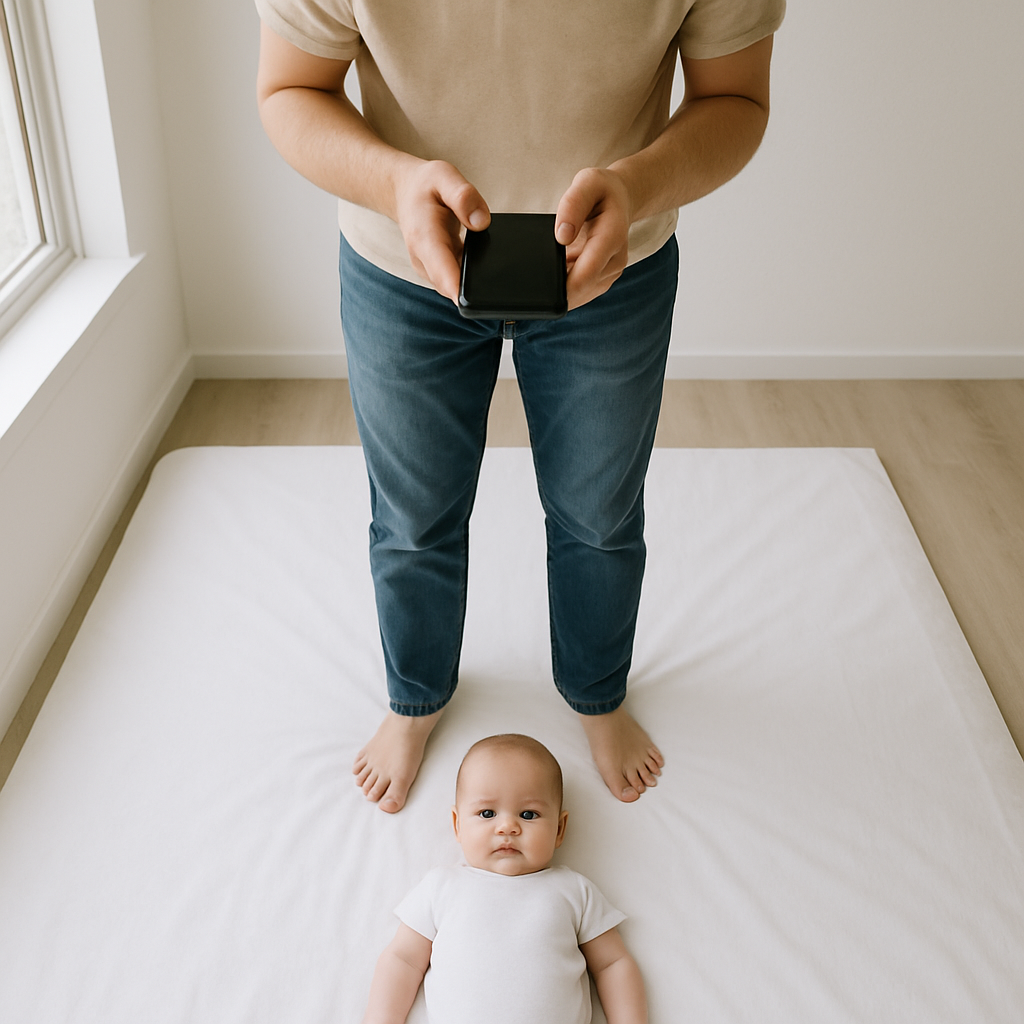
There’s something oddly intimidating about taking a passport photo for an infant. Adults? Easy. Stand still. Don’t smile. Click. Done. But a wiggly six-month-old with zero interest in "official requirements"? That’s a different story. Still, it’s completely doable at home. No expensive studio visit. No wrestling with awkward photo booths. Just a bit of patience, decent lighting, and a clean white background. This guide walks through exactly how to take a baby passport photo with a white background DIY-style - step by step, no fluff, and no panic.
Why DIY Baby Passport Photos Actually Make Sense
Here’s a hot take: most parents overcomplicate this. A passport photo isn’t a fashion shoot. It’s not about capturing personality. It’s about meeting strict government rules. Once that’s clear, everything becomes simpler. Doing it at home gives parents:
- Full control over timing - because infants run on their own schedule.
- Unlimited retakes without extra fees.
- A calm environment instead of a bright, noisy studio.
- Significant cost savings.
And honestly? A quiet living room often works better than a photography shop filled with strangers.
Understanding Passport Photo Requirements for Infants
Before grabbing a camera, it’s important to understand the basic rules. Every country has specific guidelines, but most share common requirements.
General Baby Passport Photo Rules
1. Plain white background. 2. Even lighting - no shadows on the face or behind the head. 3. Eyes open and visible. 4. Neutral expression - no big smiles or crying faces. 5. No visible hands supporting the child. 6. No hats, headbands, or pacifiers. Sounds simple, right? In practice, the biggest challenge isn’t the camera. It’s cooperation.
Setting Up the Perfect White Background at Home
This part makes or breaks the shot. A true white background matters. Off-white, beige, patterned blankets - they won’t pass. The backdrop should look like a clean sheet of paper. Here are easy DIY options:
Option 1 - Use a White Sheet
Iron it. Yes, actually iron it. Wrinkles create shadows. Lay it flat on the floor near a window for natural light. If photographing a newborn who can’t sit, place the child gently on the sheet. Make sure fabric extends well beyond the head in every direction.
Option 2 - Poster Board Setup
Tape a large white poster board against a wall. Let it curve slightly where it meets the floor. That curve eliminates harsh shadow lines and creates a seamless look. It’s a simple trick photographers use all the time.
Option 3 - Mattress Trick
Lay a firm white blanket over a mattress. Position the little one flat on their back. Stand directly above and shoot downward. No extra props. No fancy lighting. Clean. Simple.
Lighting - The Secret Ingredient
Lighting can turn a perfect setup into a rejected application in seconds. Natural light wins every time. Position the setup near a window with indirect daylight. Not direct sunlight. Harsh sun creates shadows under the nose and chin, and passport authorities hate that. If you ask most photographers, they’ll say the same thing: soft side lighting works best. Avoid:
- Overhead ceiling lights.
- Flash photography.
- Mixed lighting sources.
If the face looks evenly lit and shadow-free to the naked eye, you're probably on the right track.
How to Position the Infant Correctly
This is where patience comes in. For newborns who cannot sit upright:
- Lay them flat on their back.
- Ensure their head faces straight up.
- Take the photo directly from above.
For older infants who can sit:
- Sit them against the white background.
- Make sure their head stays centered.
- Keep shoulders visible.
The face must look straight at the camera. No tilting. No turning. No dramatic angles. Think of it like a driver’s license photo - just much cuter.
Keeping Eyes Open Without Chaos
This might be the hardest part. Infants blink. They look everywhere except the lens. They find ceiling fans fascinating at exactly the wrong moment. A few practical tricks:
- Make soft clicking noises behind the camera.
- Hold a small toy directly above the lens.
- Photograph right after a nap when the child is calm.
- Avoid shooting during feeding time.
Timing matters more than equipment. A well-rested little one cooperates better than a tired one. Always.
Camera Settings and Equipment - Keep It Simple
A professional DSLR works. So does a modern smartphone. What matters more than the device? Stability and clarity. Use the highest resolution setting available. Avoid beauty filters or portrait modes that blur backgrounds artificially. Passport photos must look natural. Stand about 3 to 4 feet away. Zooming too close can distort facial features, especially noses. And distortion leads to rejection. If possible, use:
- Tripod for steady framing.
- Timer mode to avoid shake.
- Multiple shots in quick succession.
Take at least 20 photos. Seriously. The perfect frame often appears somewhere in the middle of a rapid burst.
Editing and Cropping the Right Way
Editing should be minimal. No skin smoothing. No color correction filters. No background replacement tools. Crop the image according to official size guidelines. The head must occupy a specific percentage of the frame depending on your country’s rules. This is where online tools can help. Parents who want an easier solution often use BabyPassportMaker.com. It automatically adjusts sizing, checks alignment, and ensures compliance with passport regulations. That saves guesswork - and avoids rejected applications. Sometimes a second set of digital eyes makes all the difference.
Common Mistakes That Cause Rejection
This is important. Even a small error can delay travel plans. Watch out for:
- Visible parental hands in the frame.
- Shadows behind the head.
- Yellow or cream-colored backgrounds.
- Closed eyes.
- Open mouth or exaggerated expression.
- Blurry focus.
If something looks slightly off, retake it. It’s faster than reapplying.
What About Very Young Newborns?
Good question. For tiny newborns who cannot hold their head up, laying them down is completely acceptable in most countries. Just ensure:
- Head remains straight.
- No shadows around ears.
- Eyes are open.
Sometimes this takes patience. And a few tries. And maybe a short break in between. That’s normal.
Final Checklist Before Submitting
Before printing or uploading, review everything carefully: 1. Is the background pure white? 2. Is lighting even and shadow-free? 3. Are both eyes clearly visible? 4. Is the head centered? 5. Is the image sharp and high resolution? If every answer is yes, you’re ready. Simple as that.
DIY Baby Passport Photo - Worth It?
Honestly, yes. With decent light, a white sheet, and a bit of patience, parents can produce a perfectly acceptable passport photo at home. It doesn’t require professional gear or photography skills. It requires attention. Think of it like baking from scratch. The ingredients are basic. The instructions are straightforward. But skipping one small step changes the result entirely. Follow the rules. Take multiple shots. Double-check measurements. And if resizing feels confusing, tools like BabyPassportMaker.com can simplify the final step without turning it into a technical headache. In the end, the goal isn’t perfection. It’s compliance. A calm environment. A clean white background. Even light. Centered face. That’s it. Once the passport arrives in the mail, all the effort fades into the background - replaced by travel plans, airport moments, and new experiences waiting ahead. And that tiny photo? It becomes the first official step into a much bigger world.