Baby Passport Photo Background Color Rules and Hacks
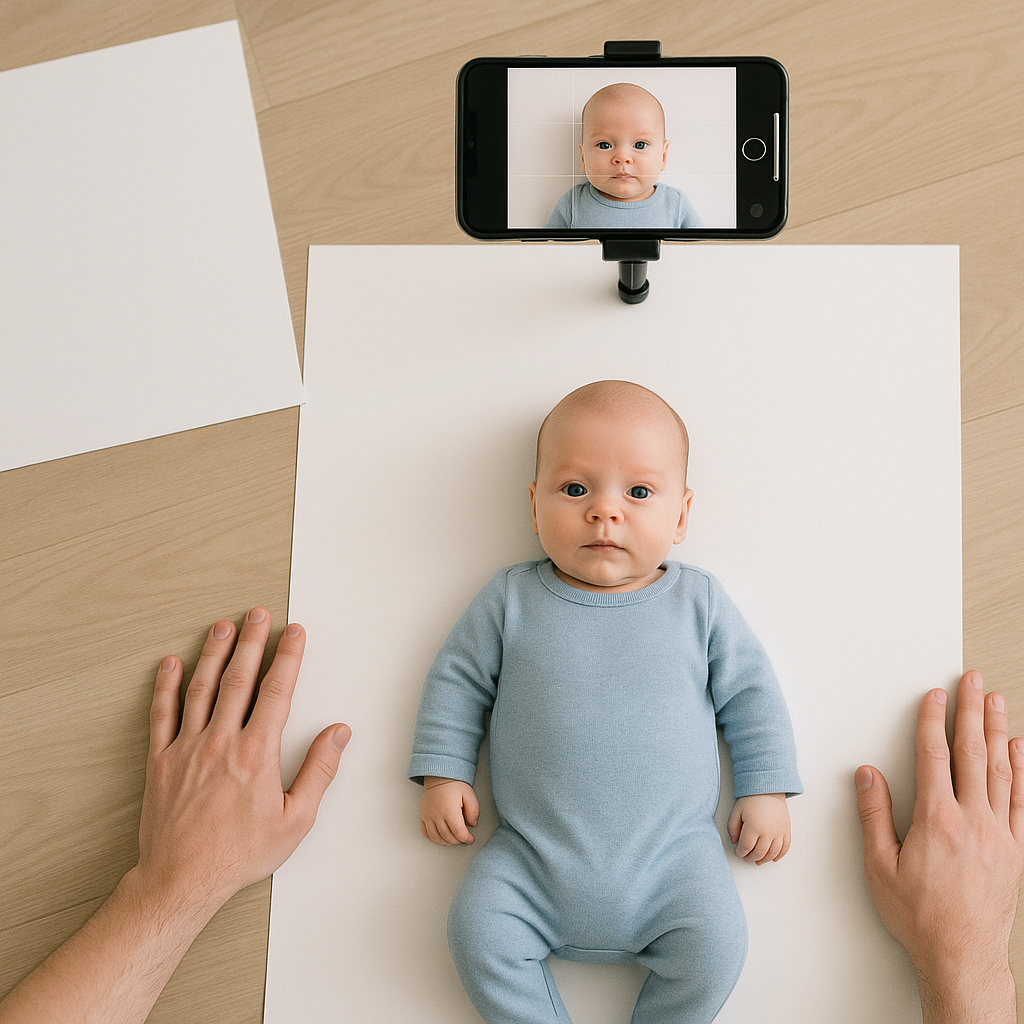
Getting a passport photo for a baby sounds simple. Put the little one in front of a wall, snap a picture, send it off. Done. Right?
Not exactly.
When it comes to baby passport photo background color rules, the details matter more than most parents expect. A slightly off-white wall, a soft shadow, a textured blanket - small things can trigger rejection. And no one wants to delay travel plans over a backdrop mistake.
This guide breaks down the exact color requirements, common pitfalls, and a few smart hacks that make the process smoother. It also explains how tools like BabyPassportMaker.com help parents get compliant photos without turning their living room into a photography studio.
What Color Should a Baby Passport Photo Background Be?
Here’s the short version: plain white or off-white.
That’s it. No patterns. No cute nursery walls. No cream tones that lean yellow. Immigration authorities want a clean, neutral background so the baby’s face stands out clearly.
Think of the backdrop as a blank sheet of paper. Its job is to disappear.
Official Background Requirements
- Solid white or very light off-white
- No textures or visible patterns
- No shadows
- No objects in the frame
- Even lighting across the entire image
Sounds straightforward. But real life with a baby rarely is.
Why Background Color Rules Are So Strict
If you ask most parents, they assume these rules are just bureaucratic nitpicking. Honestly, they’re not.
Passport photos are scanned and processed using facial recognition technology. A clean white setting creates contrast. That contrast helps systems detect facial features accurately. Add color, texture, or shadow, and it becomes visual noise.
Imagine trying to read black text on patterned wallpaper. Frustrating, right? That’s what an off-color setting does to image processing software.
The stricter the country, the less wiggle room you get.
Common Mistakes Parents Make
Even careful caregivers run into trouble. Here are the usual missteps.
1. Using a Cream or Beige Wall
It may look white to the eye. The camera says otherwise. Many indoor walls have warm undertones that show up clearly in photos.
2. Shooting on a Bed or Blanket
Blankets wrinkle. Wrinkles create shadows. Shadows lead to rejection. Even if the fabric is white, texture becomes a problem.
3. Letting Shadows Sneak In
Overhead lighting often casts subtle shadows behind the baby’s head. Those faint gray shapes? They count.
4. Editing the Background Incorrectly
Some parents try to fix color digitally but end up with harsh cut-out edges or uneven white patches. Authorities can spot over-editing surprisingly fast.
Lighting and Background - They Work Together
Color isn’t the only factor. Lighting can make a perfectly white wall look gray or blue.
Natural daylight works best. Position the baby facing a window. Avoid direct sunlight, though - it creates bright spots and deep shadows.
Indoor lighting? Use soft, even sources from both sides if possible. Balanced light keeps the backdrop looking clean and consistent.
It’s a bit like baking. The ingredients matter, but temperature changes everything.
Easy Hacks for Perfect Baby Passport Photo Backgrounds
Here’s where things get practical.
Hack #1 - Use a White Poster Board
Large white poster boards from a stationery store work beautifully. They’re smooth, bright, and inexpensive. Place one flat behind the baby or tape it securely to a wall.
Hack #2 - Lay the Baby on a White Sheet (Correctly)
If laying the baby down, stretch a plain white sheet tightly over a firm surface. Pull it taut to remove wrinkles. Smooth it carefully before placing the child down.
Hack #3 - Shoot from Above
For newborns who can’t sit upright, place them on their back and take the photo from directly above. Keep the camera parallel to the face. No angles.
Hack #4 - Let Technology Help
Sometimes, the easiest route is using a specialized service. Platforms like BabyPassportMaker.com guide parents through the process and adjust the image to meet official standards. That means proper sizing, compliant white background correction, and format alignment.
It removes guesswork. And guesswork is what usually causes rejection.
Country-Specific Background Variations
Most countries follow similar white-background rules. Still, there are slight differences worth noting.
- United States: Plain white background required.
- United Kingdom: Light cream or light gray may be acceptable, but white is safest.
- Canada: White or very light-colored, uniform background.
- Australia: Plain light-colored background, no shadows.
When in doubt, choose bright white. It’s the universal safe zone.
What About Props and Supports?
Here’s a question many parents ask: can a baby sit in a car seat?
Generally, no - unless the seat is fully covered in white fabric and no part of it shows. Visible straps, patterned cushions, or colored edges will cause issues.
Hands supporting the baby? Also not allowed in the final image. If someone must hold the infant, their hands must be completely out of frame.
The final photo should show only the baby against a plain white field. Nothing else.
Step-by-Step Guide to Getting It Right
Let’s simplify the process into clear steps.
- Choose a smooth, white surface.
- Ensure bright, even lighting with minimal shadow.
- Dress the baby in clothing that contrasts with white.
- Position the head straight, eyes open if possible.
- Take multiple photos.
- Review for color accuracy and shadowing.
- Use a trusted passport photo tool to finalize sizing and compliance.
Taking several shots increases your odds dramatically. Babies wiggle. Blink. Turn away. Patience pays off.
Clothing and Contrast Matter Too
A white outfit against a white background can make the baby blend in. Choose soft colors - light blue, pale pink, gentle gray. Avoid bright neon tones and busy patterns.
The goal is clear facial visibility. Everything else supports that mission.
Can You Fix Background Issues After Taking the Photo?
Yes, but carefully.
Digital background removal tools can help, yet aggressive editing leaves unnatural edges. That’s risky. Authorities look for authenticity. A harsh outline around the head can trigger suspicion.
This is where purpose-built platforms stand out. They adjust brightness, ensure uniform white color, and maintain natural edges so the image looks genuine.
Quick edits in random apps? Not always reliable.
Why Getting It Right the First Time Matters
Passport application delays aren’t just inconvenient. They can cancel trips, postpone family visits, or create stress before international travel.
And let’s be honest - retaking a baby photo is rarely fun.
A compliant background color might seem like a tiny detail. It isn’t. It’s the foundation of the entire image.
Think of it like building a house. If the base is off, everything above it wobbles.
Final Thoughts on Baby Passport Photo Background Color Rules
White. Clean. Even. Simple.
That’s the formula.
Focus on a smooth, bright surface. Eliminate shadows. Avoid texture. Double-check lighting. When in doubt, lean toward pure white rather than cream or gray.
Parents don’t need professional studio setups to meet official requirements. With careful preparation - or the right online tool - they can create compliant photos at home.
Because at the end of the day, the goal isn’t perfection. It’s approval.