Baby Passport Photo Template for Home Printing
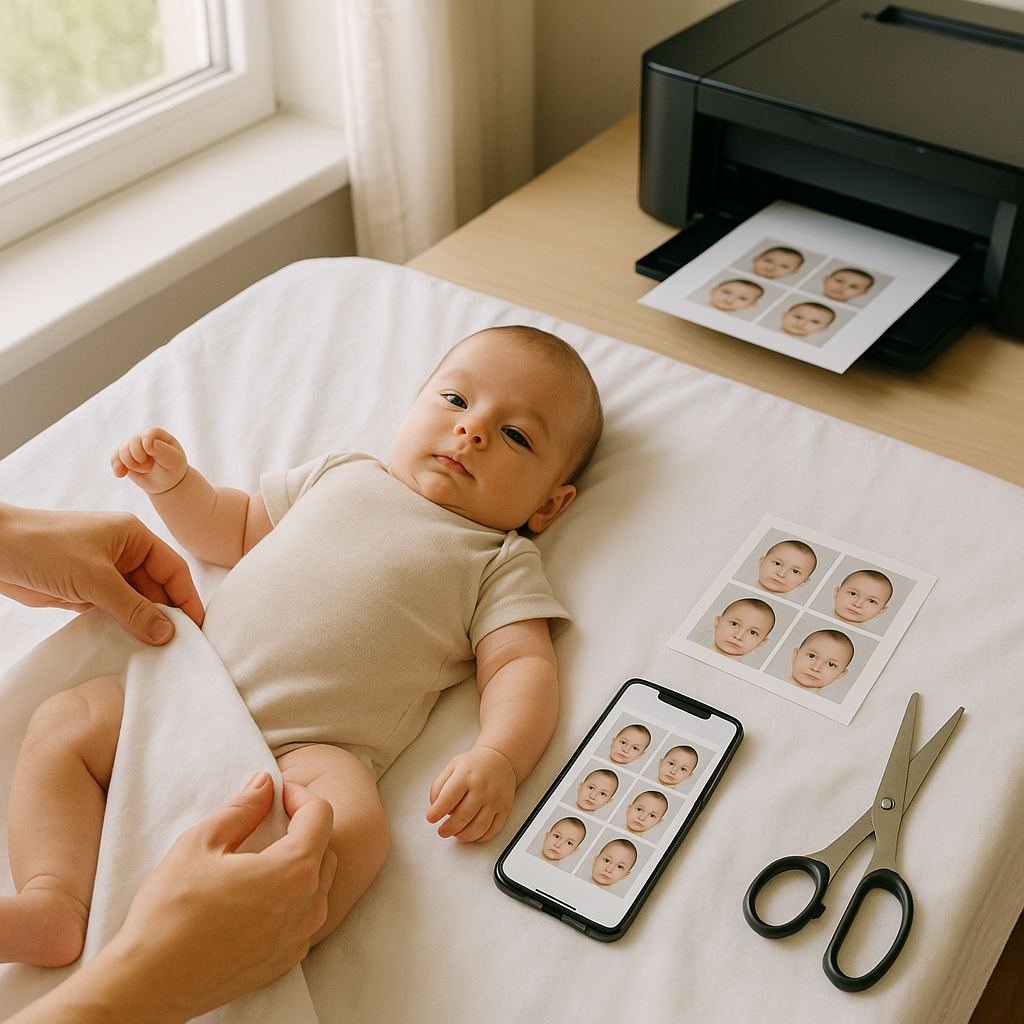
Getting a passport photo for a baby sounds simple. Until it isn’t.
One minute, everything feels manageable. The next, there’s a wiggly infant, uneven lighting, and a growing sense of “Why didn’t anyone warn me?” If you ask most parents, they’ll admit the photo part is oddly stressful. Not because it’s complicated - but because it has to be precise.
That’s where a baby passport photo template for home printing becomes a quiet hero. It turns chaos into structure. Guesswork into clarity. And honestly, it saves both time and sanity.
This guide breaks down exactly how to use a passport photo template at home, what to watch for, and why services like BabyPassportMaker.com make the whole process dramatically easier.
Why Baby Passport Photos Are Surprisingly Tricky
Adults can follow instructions. Babies? Not so much.
Passport offices have strict requirements. The baby must face forward. Eyes open. Neutral expression. Plain white background. No shadows. No hands visible. No pacifiers. Sounds straightforward, right?
Here’s the reality:
- Babies tilt their heads.
- They blink at the wrong moment.
- They slump to one side.
- They grab at clothing.
- Lighting creates unexpected shadows.
It’s like trying to photograph a tiny, unpredictable celebrity who refuses direction.
This is why structure matters. A proper passport photo template gives parents a clear frame of reference - exact sizing, head placement, spacing, and alignment.
What Is a Baby Passport Photo Template?
At its core, a baby passport photo template is a pre-sized digital layout formatted to meet official government requirements. It ensures the final printed image matches exact dimensions - typically 2x2 inches in the United States - with proper head height and positioning.
Think of it like a stencil. Without one, you're eyeballing proportions. With one, you're working inside defined borders.
What a Good Template Includes
- Correct overall dimensions for your country.
- Guidelines for head height and eye placement.
- Proper background formatting.
- High-resolution export for printing.
- Layout optimized for standard photo paper sizes.
Miss any of these and you risk rejection. And no one wants to re-do baby photos.
Why Print Passport Photos at Home?
Here’s a hot take - professional studios aren’t always better for infants.
Babies are calmer at home. Familiar environment. Controlled timing. No bright studio lights. No strangers hovering.
Home printing also offers:
- Cost savings compared to retail photo centers
- Unlimited retakes without extra fees
- Flexible scheduling around naps
- Immediate access to digital backups
Honestly, the convenience alone makes it worth considering.
Step-by-Step: Using a Baby Passport Photo Template at Home
Let’s break it down into manageable steps.
1. Set Up the Background
A plain white sheet works beautifully. Lay it flat on the floor or drape it over a firm surface. Avoid textured walls or patterned fabrics.
Natural daylight near a window is your best friend. Soft. Even. Flattering.
2. Position the Baby Correctly
Lay infants on their back if they can’t sit unsupported. Ensure:
- Face is centered
- Eyes are open
- Mouth is closed or neutral
- No visible hands in frame
It may take several shots. That’s normal.
3. Upload the Image to a Template Tool
This is where BabyPassportMaker.com shines. The platform automatically formats photos to match passport requirements. It adjusts size, spacing, and alignment so parents don’t have to calculate millimeters.
Instead of manually cropping and hoping for accuracy, the template guides placement precisely.
4. Download High-Resolution File
Always choose maximum resolution. Grainy prints lead to rejections.
5. Print on Quality Photo Paper
Use glossy or matte photo paper designed for inkjet printers. Standard 4x6 sheets typically contain multiple passport-sized images arranged by the template.
Cut carefully along the guidelines. Clean edges matter more than people realize.
Common Mistakes When Printing Baby Passport Photos
Even small missteps can cause delays.
Here are the biggest pitfalls:
- Incorrect head size ratio
- Shadows behind ears
- Red-eye effect
- Low contrast lighting
- Overexposed background
- Printing on regular paper instead of photo stock
Templates reduce these errors because they create consistency. And consistency is everything in official documentation.
How BabyPassportMaker.com Simplifies Everything
Not all online tools are equal. Some offer generic cropping boxes and leave the rest to chance.
BabyPassportMaker.com focuses specifically on infant passport requirements. That niche focus matters.
Key Benefits
- Automatic sizing for different countries
- Built-in compliance checks
- Clean printable layout
- Digital download for online applications
- User-friendly interface
It’s the difference between assembling furniture without instructions and following a clear blueprint.
Parents don’t need to become passport regulation experts. The system handles technical formatting.
Understanding Passport Photo Requirements for Babies
Rules can vary slightly by country, but most include:
- White or off-white background
- No other people visible
- Neutral expression
- No headwear unless medically necessary
- Full face visible
For newborns, slight allowances exist - especially regarding head support - but the face must remain unobstructed.
It’s not about aesthetics. It’s about biometric recognition. The image needs clarity for identification systems.
Is Home Printing Really Reliable?
Short answer? Yes - if done correctly.
Modern printers produce professional-grade quality. The key factors are:
- Proper lighting during photography
- Accurate template formatting
- High-resolution export
- Correct paper type
Skip any of those and quality drops fast. Follow them carefully and results rival store services.
Have you ever noticed how official photos look deceptively simple? That simplicity is engineered. A template replicates that engineered precision.
Cost Comparison: Studio vs. Home Template
Let’s talk numbers.
Retail photo centers often charge premium rates for infant passport pictures. Add travel time, waiting, and potential retakes - costs climb quickly.
Using a baby passport photo template for home printing typically costs a fraction of that. One digital file. Multiple prints. Unlimited attempts.
Financially, it just makes sense.
Tips for a Smooth Experience
A few practical suggestions can make everything easier:
- Take photos when the baby is well-rested
- Use burst mode on your camera
- Avoid flash if possible
- Check the final image at 100% zoom
- Print a test sheet first
Small adjustments often make a big difference.
Final Thoughts on Baby Passport Photo Templates
Passport photos are not glamorous. They’re not sentimental keepsakes. They’re functional images with strict standards.
But getting them right matters.
A well-designed baby passport photo template for home printing removes the uncertainty. It transforms a potentially frustrating task into a controlled, step-by-step process.
And when parents use specialized platforms like BabyPassportMaker.com, they gain structure without complexity.
Simple tools. Clear formatting. Reliable output.
Sometimes that’s all you need.
No stress. No guesswork. Just a tiny photo - done correctly the first time.