How to Analyze a Passport Photo Example to Ensure Government Acceptance in 2026
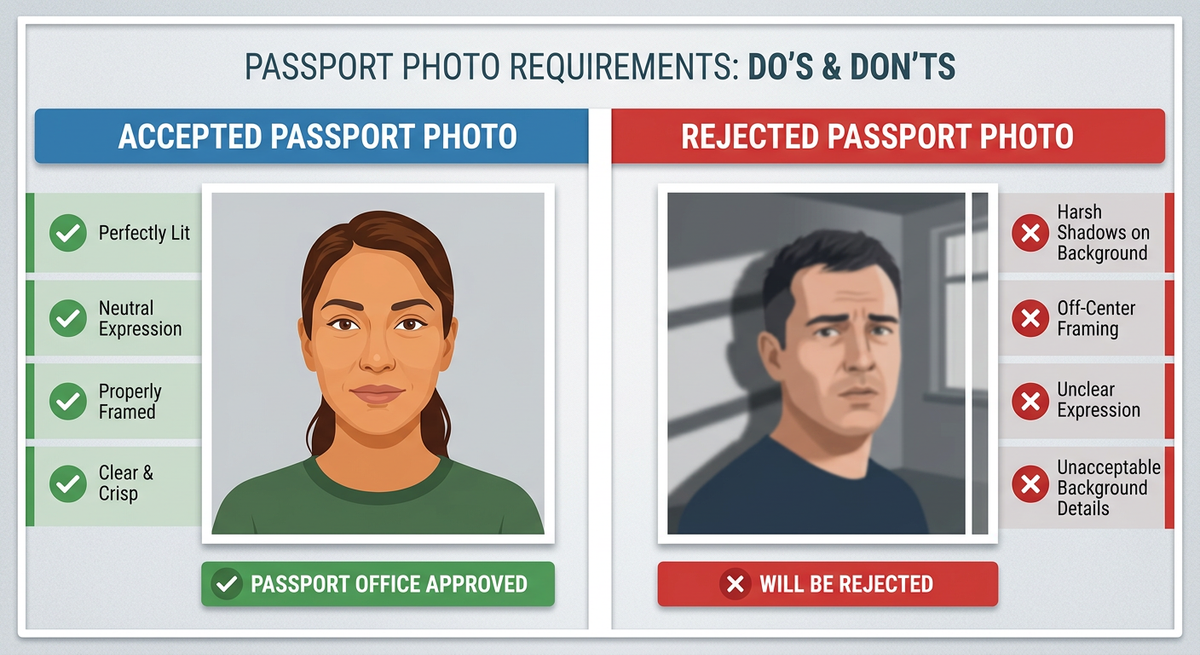
Capturing a compliant photograph for official documents can be surprisingly complex, especially when dealing with the strict requirements set by passport authorities. A single misplaced shadow or an incorrect facial expression is often enough to result in an application being returned. Learning how to properly interpret a high-quality passport photo example is the most effective way to identify potential issues before they cause delays in your travel or immigration plans.

Quick Summary
Successfully navigating passport application requirements requires comparing your own photos against official guidelines. By analyzing a verified passport photo example, you can identify common errors such as improper lighting, incorrect head positioning, or non-compliant backgrounds.
- Ensure even lighting to avoid shadows on the face or background.
- Maintain a neutral expression with eyes clearly visible.
- Verify that head size and positioning meet specific mm-based requirements.
- Use a plain, light-colored background without patterns or textures.
Table of Contents
- Quick Summary
- Understanding Passport Photo Examples
- Identifying Technical Compliance Standards
- Common Pitfalls and Troubleshooting
- Step-by-Step Analysis Guide
- FAQ
- Recommended Reads
Understanding Passport Photo Examples
When reviewing a passport photo example, your primary goal should be to identify the structural relationship between the subject and the frame. Governments define specific margins, often referred to as the 'chin-to-crown' measurement, which dictate how much of the frame the face must occupy. A correct example will show the top of the head and the chin positioned with specific buffer zones to allow for cropping during the printing process.
It is equally important to examine the lighting quality in these examples. High-quality submissions feature soft, diffused light that minimizes harsh shadows behind the ears or under the chin. If you are comparing your draft against an official guide, look for the absence of red-eye and reflections on eyeglasses. If you are preparing an Australian baby passport photo or any other specialized document, the standard for infants often allows for slight variations in expression, but the lighting requirements remain non-negotiable.
Identifying Technical Compliance Standards
Technical compliance goes beyond just how the photo looks; it encompasses the digital integrity of the file. Most modern passport agencies require high-resolution files, typically at 600 dpi, to ensure that facial features are sharp and identifiable by biometric scanners. When examining a reference, pay close attention to the background color, which is almost universally required to be a plain, uniform white or light grey.
Digital manipulation is a significant concern for authorities. While modern tools can help you reach government compliant images, any editing that alters the person's physical appearance - such as smoothing skin or removing blemishes - is grounds for immediate rejection. When looking at professional examples, notice that the skin texture remains natural. The goal of the AI passport photo generator should be to facilitate correct framing and background removal without distorting the underlying identity of the applicant.
Analyzing Facial Expression and Pose
The facial expression in a valid passport photo examples series is almost always neutral. A closed mouth is typically required, and both eyes must be open and looking directly at the camera. If you are photographing a young child, these standards can be challenging to meet, which is why reviewing a successful UK baby passport photo can provide useful insight into how to manage the child's gaze while maintaining a square-on pose.
Common Pitfalls and Troubleshooting
Rejection often stems from subtle issues that the human eye might overlook at first glance. One of the most frequent mistakes is the presence of 'noise' or shadows in the background. Even a slight shadow cast by the subject against the backdrop can trigger an automated rejection by government systems. To troubleshoot this, ensure your light source is positioned directly in front of the subject, rather than from the side, to distribute light evenly across the background.
Pro Tip: If you notice shadows on the wall behind you, move the subject at least 50 centimeters away from the background. This distance helps ensure the background is evenly lit and out of the focus plane of the camera lens.
Another common issue involves reflections on eyeglasses. Many jurisdictions now prefer that glasses be removed entirely to avoid glare. If you must wear them for medical reasons, ensure the frames do not obscure your eyes or cast a shadow over the iris. When in doubt, checking the specific Canada baby passport photo requirements or your specific country's guidelines will clarify if glasses are permitted for your specific application.
Step-by-Step Analysis Guide
To perform a rigorous check of your photograph, follow these steps to mimic the verification process used by passport offices:
- Check the Background: Is it solid, light-colored, and shadow-free? If there is any furniture or wall texture visible, the photo will likely be rejected.
- Measure the Head Size: Use a digital ruler or grid tool to ensure the crown of the head to the chin occupies the specified percentage of the total height (typically 70-80%).
- Verify Lighting Balance: Look for 'hot spots' on the forehead or nose. If the image is overexposed, the details in these areas will wash out, making it impossible for biometric systems to map your facial features.
- Confirm Eye Visibility: Are both eyes fully open and unobstructed by hair or frames? If the eyes are partially closed or red-eye is present, retake the photo immediately.
- Review File Specs: Ensure the file meets the required dimensions and resolution. Submitting a low-resolution file or an incorrect aspect ratio is a common cause for technical failure.
FAQ
Can I use a filtered or edited photo? No. Passport photos must represent your current appearance without any filters, skin smoothing, or alterations that change your facial features.
Does my hair need to be off my face? Generally, yes. Your face must be clearly visible. While hair can frame your face, it should not cover your eyes or eyebrows.
What if the background of my photo is slightly grey? Most authorities accept plain white or light, neutral grey backgrounds. The critical requirement is that the background must be uniform and free of patterns or shadows.
Are there specific rules for children's photos? Yes, though some countries are more lenient. Infants may have their mouths slightly open or be in a supine position on a white sheet, but the lighting and head-centering rules still apply to ensure the photo is readable.