How to Meet the Chinese Passport Photo Size and Submission Standards
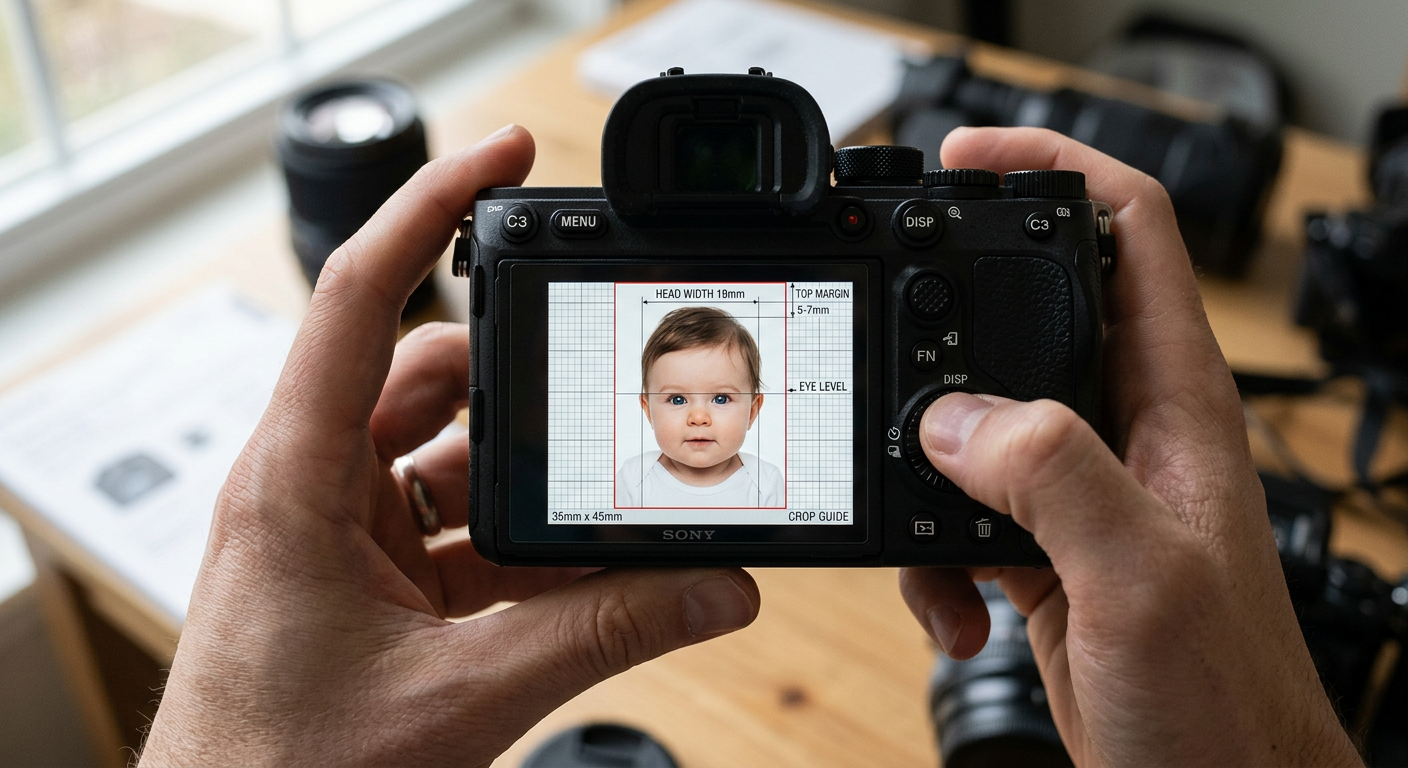
'The upload portal is broken' is not a diagnosis. When an application fails to process your image, four different formatting metrics trigger an automatic rejection, and they need distinct physical fixes before you attempt another submission. Getting the chinese passport photo size right on a digital canvas is the only way to clear the initial biometric scanner.
Why the chinese passport photo size triggers automatic rejections
The Chinese consular system uses an automated biometric tool that measures pixel distances on your uploaded file before a human officer ever reviews the application. It maps the geometry of the face against a rigid mathematical grid. If the head width is a single millimeter too narrow, or if the digital background registers as off-white rather than pure white, the software drops the upload immediately. You cannot bypass this scanner. You must build an image file that answers exactly what the algorithm measures.
Quick Summary
Securing approval for a Chinese passport requires precise alignment with the consulate's digital processing grid, which is stricter than most international standards. The official physical print size is 33mm by 48mm, requiring a digitally verified pure white background and exact facial proportions measured to the millimeter.
- The physical photograph must measure exactly 33mm wide and 48mm high.
- The digital upload file must be a JPEG between 40 KB and 120 KB.
- Digital pixel dimensions must range from 354x472 pixels to 420x560 pixels.
- The subject's head width must measure between 15mm and 22mm.
- The head height from chin to crown must occupy 28mm to 33mm.
Table of Contents
- Why the chinese passport photo size triggers automatic rejections
- 1. Frame the shot for strict margin limits
- Millimeter accuracy determines automated acceptance
- 2. Light the face to eliminate background shadows
- Directional flash creates artificial depth
- 3. Dress the applicant to contrast with the backdrop
- White clothing merges into the required white background
- 4. Format the digital file for consular upload
- Compression artifacts fail the biometric scan
- Common Pitfalls & Troubleshooting
- FAQ
- Recommended Reads
1. Frame the shot for strict margin limits
Millimeter accuracy determines automated acceptance
The physical dimensions required for the final print are 33mm wide by 48mm high. This is unusually narrow compared to global standards. For context, the malaysia passport photo size spans 35mm by 50mm, giving the photographer slightly more horizontal leeway to capture the shoulders. The Chinese specification leaves almost no room for error on the X-axis, forcing a very tight crop around the ears.
The biometric system calculates the distance from the top of the head - the anatomical crown, explicitly excluding hair volume - to the top edge of the photo. This top margin must sit strictly between 3mm and 5mm. Below the chin, the margin must leave at least 7mm of visible space down to the bottom edge of the frame.
The mistake people make here is framing too tightly during the initial capture. Parents photographing infants often zoom in with their smartphone to fill the screen with the baby's face, inadvertently clipping the shoulders out of the frame. Because the final head width must measure exactly 15mm to 22mm wide within a 33mm total width, a tight initial shot makes it mathematically impossible to crop the file later while maintaining the required 3-5mm top margin and full shoulder visibility.
Shoot your image from at least four feet away. Leave excessive empty space around the subject's head, capturing down to the mid-chest. You will use a digital cropping tool later to enforce the strict margins.
Practical rule: Always capture a wider field of view than the final dimension requires; you can crop a wide shot into compliance, but you cannot fabricate missing shoulder margins on a tightly framed image.
2. Light the face to eliminate background shadows
Directional flash creates artificial depth
The Chinese consulate mandates a pure white background without texture, gradients, or drop shadows. Standard residential lighting operates between 2700K and 3000K, which casts a warm yellow hue. When this yellow light hits a white wall, the resulting pixel data registers closer to RGB 240, 230, 200. The upload scanner looks for a pure white value of RGB 255, 255, 255, and will reject warm-toned backgrounds as "colored."
Automated scanners separate the subject from the background by looking for high contrast at the edge of the face, shoulders, and hair. If a shadow falls on the wall directly behind the subject's neck, the software interprets that dark cluster of pixels as part of the body. This calculation artificially widens the subject's profile, pushing the head width past the 22mm maximum limit and triggering a rejection for incorrect proportions.
The most common error is placing the subject just a few inches from the wall and using a single direct smartphone flash. This casts a hard, dark shadow directly behind the subject's shoulders that is impossible to remove without aggressive digital editing that degrades the image quality.
Move the subject at least two feet away from the background wall. Use diffused, indirect light facing the subject, preferably natural daylight from a large window. If you are photographing an infant lying down on a white sheet, stand at an angle so the overhead room light does not cast your own silhouette over the baby's face.
3. Dress the applicant to contrast with the backdrop
White clothing merges into the required white background
The facial recognition grid relies on distinct boundary lines at the shoulders to map the subject's posture and verify they are facing directly into the lens. The algorithm checks the horizontal axis at the bottom edge of the photo to measure shoulder alignment.
To pass this edge-detection phase, the subject must wear dark clothing to stand out against the mandatory pure white background. If the clothing matches the background, the software cannot detect where the shoulders begin. It will return an "invalid posture" or "subject not centered" error because it literally cannot see the lower half of the subject.
Applicants often assume that a white background permits any clothing color. It does not. While a malaysian passport photo requirement explicitly demands dark clothing against a blue background, the Chinese standard requires that same high contrast against white. Dressing newborns in white onesies, light gray sweaters, or pale pastel tops out of habit guarantees an automated rejection.
Dress the subject in a solid, dark color like navy blue, black, charcoal, or dark red. Ensure the neckline is high enough to be fully visible in the final crop. Wide scoop necks or deep V-necks often fall below the 48mm crop line, making the subject appear unclothed in the final submission.
4. Format the digital file for consular upload
Compression artifacts fail the biometric scan
The modern Chinese application process requires a digital file upload via the "China Consular Affairs" mobile application or web portal before you can submit your physical paperwork.
The digital file must be exactly formatted as a JPEG, weighing between 40 KB and 120 KB. The pixel dimensions must range from a minimum of 354 pixels wide by 472 pixels high, up to a maximum of 420 pixels wide by 560 pixels high. The biometric scanner analyzes pixel clarity heavily around the eyes and ears. If compression algorithms blur the irises, the system fails the file for low resolution.
The critical error applicants make is sending the finalized photo through a messaging app before uploading it. Applications like WhatsApp, iMessage, and Facebook Messenger automatically compress image files to save bandwidth. This introduces blocky artifacts around the hairline and instantly reduces the file size below the 40 KB minimum requirement.
Transfer the file directly from the camera to your upload device using a lossless method. AirDrop, a direct USB cable transfer, or an email attachment sent strictly at "Actual Size" will preserve the necessary data. Verify the file size in your computer's properties menu before attempting the upload. If you are managing multiple applications for an international trip, consulting specific Country Guides helps prevent crossing these precise digital limits with other national standards.
Common Pitfalls & Troubleshooting
When the consular application portal rejects your image, it relies on a set of automated error codes. These four failures look identical from the outside - usually just a red "Upload Failed" banner - but require completely different physical adjustments to fix.
Symptom: The portal returns "Eyes not open or visible." This is rarely about closed eyes. The true cause is usually glare reflecting off eyeglasses or a harsh flash reflection bouncing off the moisture in the iris, which blinds the scanner's pupil-detection routine. The fix is to remove all eyeglasses entirely. Chinese regulations strictly prohibit thick frames, tinted lenses, and any glass glare. Removing them is the only guaranteed way to clear this specific error.
Symptom: The portal returns "Background color does not meet standards." The scanner measures exact RGB values. Most white walls are actually painted off-white or cream, and indoor lighting pushes the color data away from pure 255, 255, 255. Do not rely on residential wall paint. The fix is to use a dedicated photography backdrop, or process the image through an automated formatting tool that strips the physical background and replaces it with a digitally verified pure white fill.
Symptom: The software flags "Face is not centered or invalid posture." The subject's head is tilted on the Z-axis - looking slightly up toward the ceiling or down toward the floor. The algorithm measures the distance from the nose to the chin and compares it to the distance from the nose to the hairline. If these lengths mismatch, it flags the alignment. To fix this, ensure the camera lens is perfectly parallel with the subject's eyes. For infants lying on their backs, shoot directly above their nose, keeping the phone completely flat and parallel to the floor.
Symptom: The error reads "Image quality too low or blurred." Aggressive JPEG compression has destroyed the edge definition around the ears and hair, or the file size has dropped below 40 KB. The fix is to export the original raw image again at maximum quality, ensuring the final output sits just under the 120 KB ceiling rather than aiming for the smallest file possible.
FAQ
Can infants have their eyes closed in a Chinese passport photo? No. Unlike some Western guidelines that offer leeway for sleeping newborns, Chinese specifications strictly require the eyes to be open and clearly visible looking at the lens. You must capture the baby while they are awake.
Do I need to print the photos if I already uploaded the digital file? Yes. The consulate still requires two identical physical prints submitted with your final application paperwork. These prints must be produced on high-quality glossy photo paper, as matte paper is routinely rejected at the physical intake desk.
Can I wear jewelry or hair accessories in the photo? Large necklaces, thick earrings, and any hair accessories must be removed. While tiny, unobtrusive stud earrings are occasionally accepted, removing all jewelry entirely is the most practical way to prevent automated rejections caused by flash reflections.
What happens if my ears are not fully visible? The biometric system requires both ears to be exposed to calculate facial symmetry and width. You must tuck all hair behind the ears. For infants, ensure no blankets, rolled towels, or parent's hands obscure the side of the head.