How to take baby passport photo in low light at home
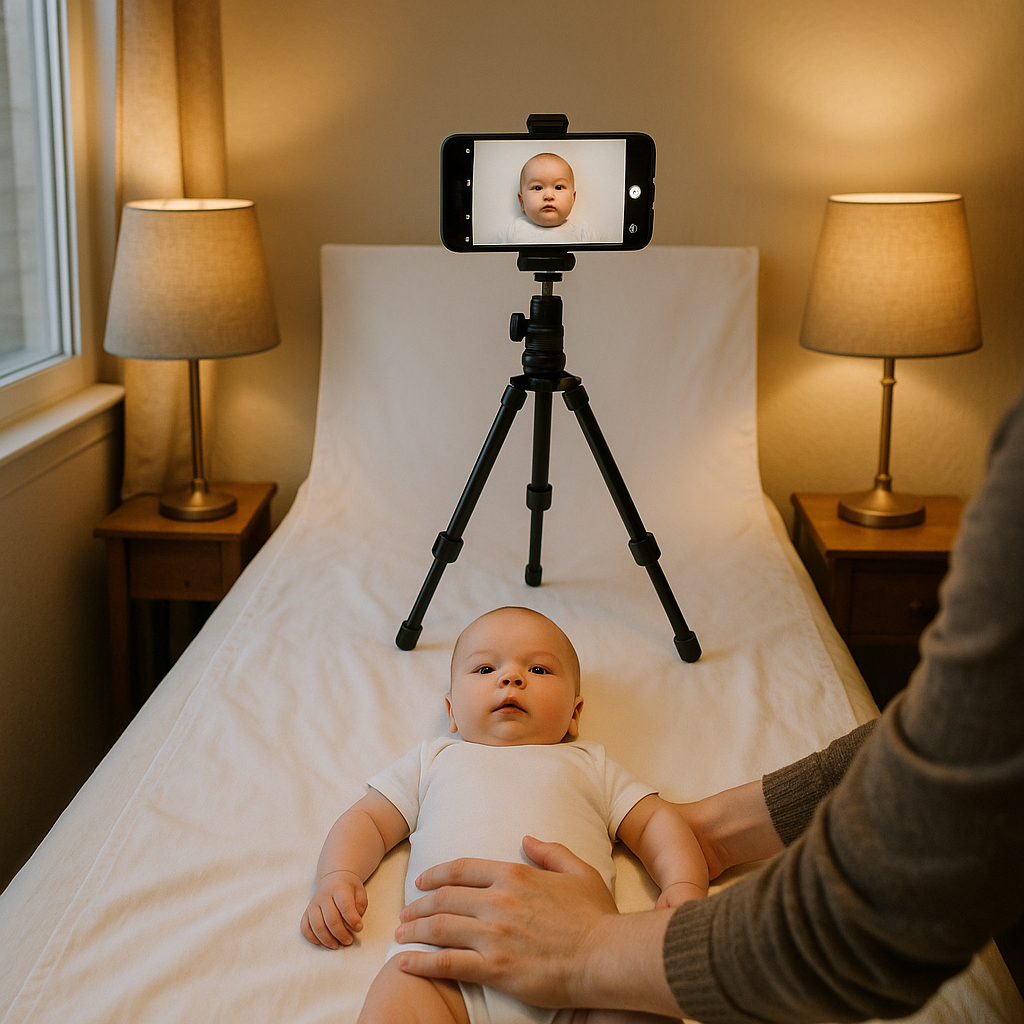
Taking a baby passport photo in low light at home can feel like trying to photograph a tiny, wiggly celebrity who refuses to cooperate with the paparazzi. The lighting is bad. The baby is moodier than usual. And somehow, the photo still needs to meet strict passport requirements. Sounds impossible? It’s not. With a few clever adjustments and a bit of patience, parents can capture a compliant baby passport photo without stepping into a professional studio. Let’s break it down in a way that actually makes sense.
Why Lighting Matters So Much for a Baby Passport Photo
Passport agencies are picky. Not in a fun way. In a precise, rule-book kind of way. A baby passport photo must have:
- Even lighting
- No harsh shadows
- No red-eye
- Clear facial visibility
- Neutral background
Low light makes all of that harder. Shadows creep in. Skin tones look off. Graininess appears. It’s like trying to paint a portrait in a dim hallway. But here’s the thing - low light doesn’t mean no options. It just means you need to be intentional.
Step 1 - Find the Best Available Light (Even If It’s Not Great)
First rule of baby passport photography at home: use what you have. Even on a cloudy day, window light is your best friend. Natural light is soft, flattering, and forgiving. Position the baby facing the window, not with light behind them. Backlighting creates shadows and makes their face darker than required. No window nearby? Try this:
- Turn on every lamp in the room
- Use bulbs with similar color temperature
- Avoid mixing warm yellow and cool white light
Consistency is key. Mixed lighting makes skin tones look strange. Passport systems don’t love strange. If you ask most photographers, they’ll say light is everything. And honestly, they’re right.
Step 2 - Create Soft, Even Illumination
Low light often means harsh shadows when you compensate with a single lamp. That’s not ideal. Instead, soften the light. Here’s how:
- Place two lamps on either side of the baby.
- Angle them slightly toward the face.
- Diffuse light with a thin white sheet or parchment paper (never let it touch the bulb).
Think of it like wrapping the baby’s face in gentle glow instead of spotlight drama. Ever noticed how dressing rooms with overhead lighting make everyone look exhausted? That’s what you want to avoid. Direct light from above creates shadows under the eyes and chin. Side lighting at face level works better.
What About Phone Flash?
Tempting. Quick. Convenient. But usually a mistake. Flash creates:
- Red-eye
- Shiny skin
- Flat facial features
- Strong shadows behind the head
If flash is the only option, stand farther away and zoom slightly instead of being right up close. That reduces harshness. Still, natural or diffused lighting wins every time.
Step 3 - Use a Plain Background
Low light makes busy backgrounds even worse. Patterns become distracting. Shadows multiply. Keep it simple. A white or light-colored wall works perfectly. No textures. No frames. No furniture peeking in. No blank wall available? Lay a white sheet flat against a wall and smooth out wrinkles. Creases can cast unwanted shadows under dim lighting. Simple backdrop. Even lighting. Calm setup. That’s half the battle.
Step 4 - Position the Baby Correctly
For newborns and infants, passport rules are slightly flexible. Eyes can be partially closed. Mouth can be slightly open. But the face must be fully visible. Lay the baby on their back if needed. Place a white sheet beneath them. Stand directly above and shoot straight down. This method works surprisingly well in low light because:
- The background stays consistent
- Shadows fall evenly
- The head remains centered
Make sure:
- No hands are covering the face
- No pacifiers
- No hats or headbands (unless medically necessary)
It may take several attempts. That’s normal. Babies don’t pose on command.
Step 5 - Adjust Camera Settings for Low Light
Modern smartphones are shockingly capable in low light. But auto mode doesn’t always make the smartest choices. If available, adjust these settings:
- Increase exposure slightly
- Lower ISO if the image looks grainy
- Turn off beauty filters
- Disable portrait mode
Portrait mode often blurs the background artificially. Passport photos require clean edges around the head. Artificial blur can cause rejection. Steady hands matter. Use both hands. Rest elbows on a table. Or better yet, use a small tripod. Tiny movements cause blur in low light. And blurry photos? Instant rejection.
Step 6 - Check for Shadows and Glare
Before declaring victory, zoom in. Look closely at:
- Shadows behind the ears
- Dark patches under the chin
- Uneven brightness across the face
Low light exaggerates contrast. What looks fine at first glance may fail official review. A good trick? Turn the photo to black and white temporarily. This helps reveal shadow intensity more clearly. If something looks off, adjust the lighting angle and try again. Yes, it takes patience. But patience beats paying for retakes.
Step 7 - Use a Professional Online Tool for Final Adjustments
Even with careful lighting, cropping and sizing must meet exact specifications. That’s where tools like BabyPassportMaker.com come in. Instead of guessing dimensions, parents can upload the image and let the service:
- Resize correctly
- Check background compliance
- Adjust alignment
- Ensure passport standards are met
Honestly, this step saves headaches. Because lighting can be fixed. Size mistakes? Not so much.
Common Mistakes When Taking a Baby Passport Photo in Low Light
Let’s call them out.
1. Standing Too Far from the Light Source
Distance reduces brightness quickly. Move closer to the window or lamp instead of increasing ISO dramatically.
2. Using Only Overhead Lighting
Ceiling lights create eye shadows and uneven skin tone.
3. Ignoring Background Shadows
If the baby sits too close to the wall, shadows appear behind the head. Pull them slightly forward.
4. Overediting
Smoothing skin or correcting color aggressively can cause rejection. Keep edits minimal.
Timing Matters More Than Equipment
Here’s a hot take - mood matters more than megapixels. A calm baby in moderate light will produce a better passport photo than a crying baby under perfect studio lighting. Choose a time when the baby is:
- Fed
- Rested
- Comfortable
Low light becomes manageable when the subject isn’t squirming every two seconds.
Can You Really Take a Baby Passport Photo at Home in Low Light?
Yes. Is it effortless? Not exactly. But it’s absolutely doable with:
- Balanced lighting
- Simple background
- Correct positioning
- Smart camera adjustments
- Proper online formatting support
Think of it like baking without the perfect oven. You compensate. You adapt. You pay attention. And in the end, you get what you need. Parents don’t need a photography degree. They just need awareness of how light behaves and how passport guidelines work. Low light isn’t the enemy. Poor preparation is. Once the setup is right, capturing a compliant baby passport photo at home becomes surprisingly straightforward. Maybe not glamorous. Maybe not quick. But completely achievable.