How to take baby passport photo on a budget 2026
Getting a passport photo for an infant sounds simple. Until it isn’t.
One minute the little one is smiling at the ceiling. The next? Full meltdown. Add strict government rules, tight deadlines, and the rising cost of studio photography in 2026, and suddenly that tiny square photo feels like a major production.
Here’s the good news - it doesn’t have to drain the wallet. With a bit of planning, decent lighting, and smart tools like BabyPassportMaker.com, parents can handle the entire process at home without sacrificing quality or compliance.
Let’s break it down step by step. No fluff. Just practical advice that actually works.
Why Professional Passport Photos Cost More in 2026
Have you checked studio prices lately? They’ve climbed. A quick visit to a photo shop can cost anywhere from $20 to $40 for a single infant passport photo session. Some places even charge extra for retakes. For one small print.
Studios factor in:
- Staff time
- Equipment maintenance
- Rent and utilities
- Multiple retakes due to movement
And babies move. A lot.
Here’s the thing - the passport office doesn’t require a professional photographer. It requires a compliant image. Big difference.
Understanding Baby Passport Photo Requirements in 2026
Before snapping anything, it helps to understand the rules. Think of them as a checklist. Miss one detail and the application might bounce back.
General Requirements
- White or light plain background
- No shadows on face or backdrop
- Eyes open and visible (when possible for newborns)
- Neutral expression
- No hats, headbands, or pacifiers
- Correct size and proportions
Sounds straightforward, right? In theory, yes. In practice, getting a six-month-old to cooperate without a shadow crossing their cheek can feel like photographing a hummingbird.
How to Take a Baby Passport Photo at Home
This is where the budget-friendly magic happens.
1. Choose the Right Time of Day
Timing matters more than camera quality. A well-rested, recently fed infant is far more likely to sit calmly for 30 seconds. Early morning often works best. Late afternoon? Risky.
Parents who treat it like a mini photo session instead of a rushed chore usually get better results.
2. Use Natural Light
Flash creates harsh shadows. Overhead lights add strange color tones. Natural daylight is your best friend.
Position the child near a window. Indirect sunlight works beautifully. Think soft, even brightness - not dramatic beams slicing across the face.
If you ask most photographers, they’ll say the same thing: light is everything.
3. Create a Simple Background
No fancy equipment needed.
A plain white sheet taped smoothly to a wall works. So does laying the infant on a wrinkle-free white blanket on the floor. Some parents even use a large poster board.
Wrinkles create shadows. Smooth it out. It’s worth the extra minute.
4. Positioning Tips That Actually Work
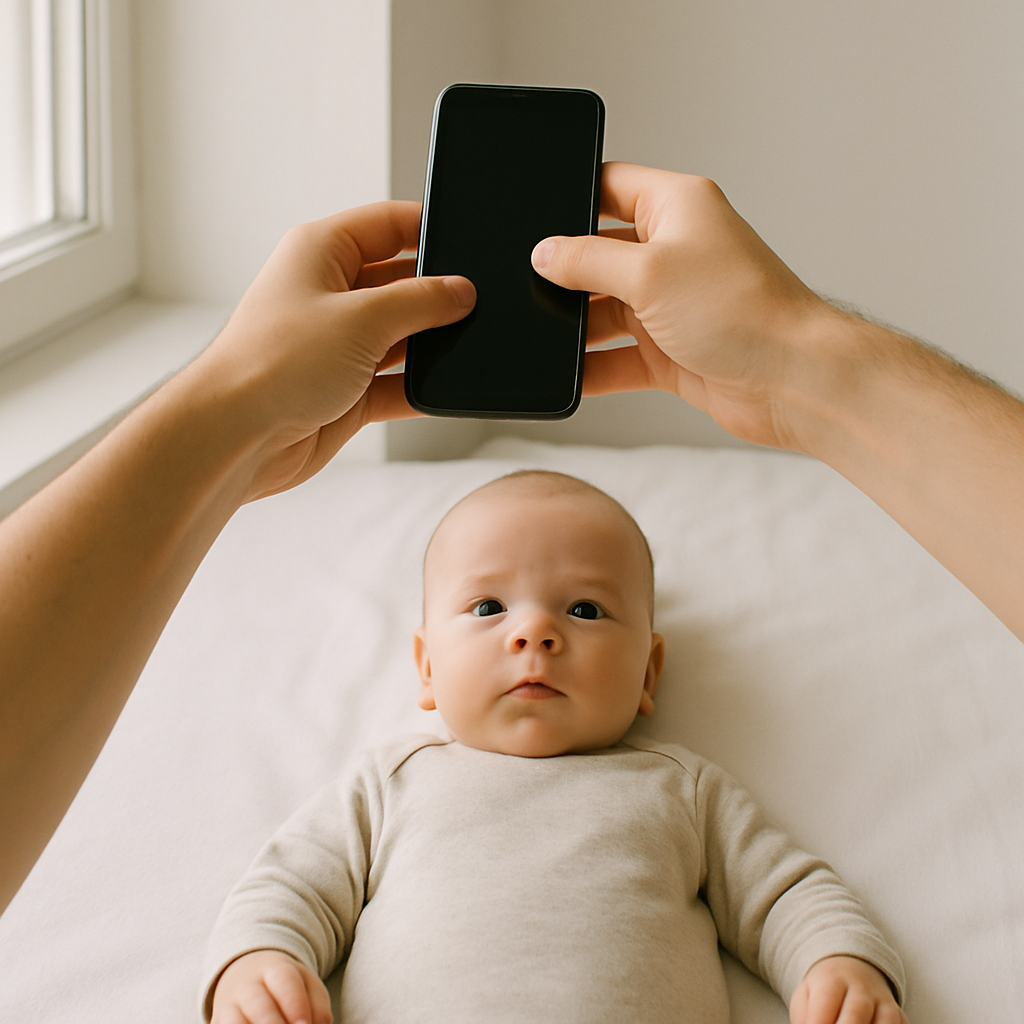
For newborns who can’t sit upright, laying them flat is perfectly acceptable as long as the camera is directly above. The head should not tilt dramatically to one side.
For older infants:
- Use a car seat with a white cover
- Remove any visible straps
- Ensure the head is straight
No hands in the frame - including a parent’s fingers sneaking in for support. That’s a common reason photos get rejected.
5. Use a Smartphone - Yes, Really
Modern phones in 2026 have more than enough resolution for passport photos. The key is stability.
Hold the device directly above the face. Keep it parallel to the ground. Take multiple shots. Ten or fifteen isn’t excessive.
Digital film is free. Use it.
Avoid These Common Mistakes
Some errors seem small but can derail the whole application.
- Shadows behind the head - Move farther from the wall.
- Red-eye effect - Avoid flash.
- Open mouth or exaggerated expression - Wait for calm.
- Incorrect crop size - Use a proper formatting tool.
- Distracting clothing - Stick to simple, light colors.
It’s like baking. Miss one ingredient and the recipe fails.
Editing and Formatting Without Paying Studio Fees
Here’s where many parents get stuck. They capture a decent image but don’t know how to size it correctly.
Guessing dimensions in a random editing app? Risky.
This is where services like BabyPassportMaker.com become incredibly useful. The platform automatically adjusts the image to meet official passport standards, removes background imperfections, and ensures proper alignment.
Instead of paying $30 for prints, parents upload one photo and get a compliant digital version ready for submission or printing.
Honestly, it’s like having a virtual photo technician - without the awkward studio lighting and waiting room.
Printing on a Budget
After formatting, printing doesn’t need to be expensive either.
Options That Save Money
- Print multiple copies on a single 4x6 sheet
- Use a local pharmacy photo kiosk
- Order budget prints online
- Use a home printer with quality photo paper
One sheet often costs less than a dollar. Compare that to studio markups and the savings add up quickly.
How to Keep the Process Stress-Free
Parents often overcomplicate this task. Perfection isn’t required - compliance is.
Some practical mindset tips:
- Expect movement and take many shots
- Stay patient
- Turn it into a short playful moment
- Don’t attempt it when the child is tired
Energy matters. If adults feel frantic, infants sense it instantly.
Calm room. Soft light. Quick session. Done.
Is DIY Always the Best Option?
Not always.
If a parent feels overwhelmed or the child has special medical considerations affecting posture or facial positioning, a professional studio may provide peace of mind.
But for most families? A home setup works perfectly well.
The idea that only photographers can produce acceptable passport images is outdated. Technology leveled the playing field.
Cost Breakdown - Studio vs. DIY in 2026
Let’s look at realistic numbers.
Professional Studio
- Session fee: $20 - $40
- Retake charges (if needed)
- Travel time
At-Home Method
- Photo taken with smartphone: $0
- Formatting via online tool: minimal fee
- Print sheet: under $1
The difference is obvious. DIY often costs a fraction of traditional options.
Final Thoughts on Taking a Baby Passport Photo on a Budget
Capturing a compliant infant passport image doesn’t require a studio appointment or a big invoice. It requires patience, decent lighting, and the right formatting support.
Think of it like assembling flat-pack furniture. Intimidating at first glance. Surprisingly manageable once broken into steps.
Parents in 2026 have better tools than ever. High-resolution smartphones. Accessible editing platforms. Affordable printing options.
So why overspend?
With preparation and resources like BabyPassportMaker.com, families can handle the entire process from the living room floor - calmly, affordably, and confidently.
And really, isn’t saving money for the actual trip a much better idea?