Taking a Baby Passport Photo with No Camera Flash
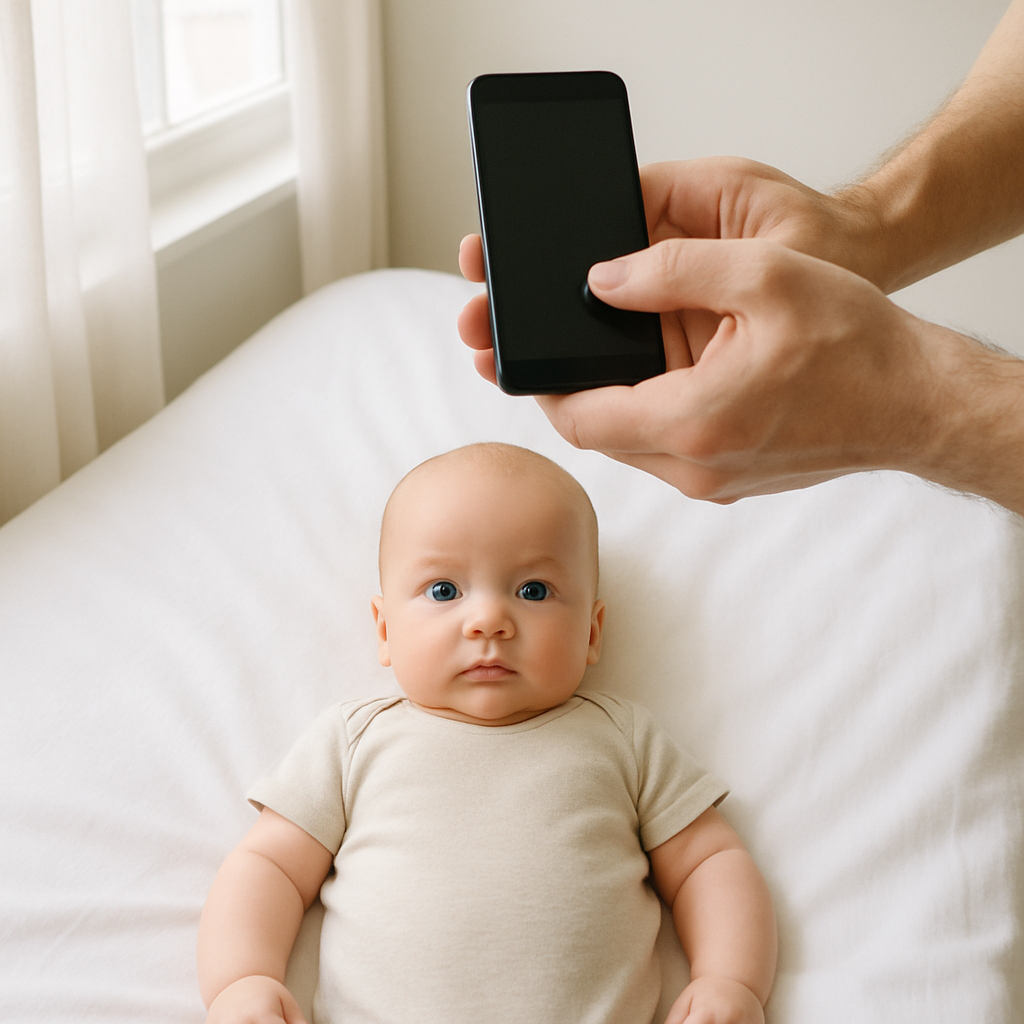
Taking a baby passport photo without using a camera flash can feel like trying to bottle lightning in a jar. Babies wiggle. Lighting shifts. And the one time everything lines up? The camera decides to focus on the wall instead. Still - it’s absolutely doable. In fact, skipping the flash is often the smarter move. Flash can startle infants, create harsh shadows, and leave that classic deer-in-headlights glare. Nobody wants that on an official document that lasts for years. This guide walks through exactly how to take a compliant baby passport photo with no camera flash - calmly, safely, and successfully.
Why You Should Avoid Flash for Baby Passport Photos
Flash seems convenient. Press a button, instant brightness. Sounds simple, right? Not quite. Here’s what actually happens when flash enters the scene:
- Babies squint or close their eyes
- Skin tones look washed out
- Shadows form behind the head
- Red-eye becomes a problem
Passport agencies require even lighting with no harsh shadows. Flash often does the opposite. It’s like trying to light a candle with a blowtorch - technically bright, but not controlled. Natural light wins almost every time.
Understanding Official Baby Passport Photo Requirements
Before even thinking about lighting, it helps to understand the rules. Passport standards don’t bend just because the subject is six months old and drooling. Most countries require:
- Plain white or off-white background
- No shadows on face or background
- Eyes open and visible
- Neutral expression
- No objects, hands, or toys in frame
For infants, slight tolerance exists - but not much. If compliance feels overwhelming, services like BabyPassportMaker.com simplify the process. They adjust alignment, background, and sizing so parents don’t have to guess. It’s like having a passport expert quietly fixing things behind the scenes.
How to Use Natural Light the Right Way
Natural light is soft. Flattering. Forgiving. But it needs direction.
1. Choose the Right Window
North-facing windows are ideal because they provide consistent indirect light. If that’s not available, any window works as long as sunlight isn’t blasting directly onto the baby’s face. Direct sun creates:
- Sharp facial shadows
- Overexposed highlights
- Uneven skin tone
Instead, position the baby about 3 to 5 feet from the window. The light should gently fall across the face like a soft blanket.
2. Turn Off All Artificial Lights
Mixing natural and artificial lighting creates strange color shifts. Skin can appear yellow or blue depending on bulb temperature. Turn off lamps. Overhead lights too. Keep it simple.
3. Watch the Background Carefully
A plain white wall works beautifully. No wall? Lay a white sheet flat against a wall or drape it over a large board. Make sure it’s smooth. Wrinkles can create unwanted shadows that cause rejection. Think of the background as a clean canvas. The baby is the artwork.
Best Positions for Taking a Baby Passport Photo
Babies don’t exactly follow posing instructions. So what works?
Option 1: Lay the Baby Down
Place a white sheet on the floor near a bright window. Lay the baby flat on their back. Stand directly above and shoot straight down. Why this works:
- Head stays supported
- No risk of slouching
- Even lighting distribution
Just make sure no shadows from the photographer fall into frame.
Option 2: Use a Car Seat with a White Cover
For younger infants who can’t hold their heads up, this method adds stability. Cover the seat with a white blanket and ensure the baby’s head is straight. Straps should not be visible. Tuck them away gently.
Option 3: Sit Upright for Older Babies
If the baby can sit independently, position them against a white wall near natural light. Keep posture straight. No tilting. And yes - patience helps.
Camera Settings Without Flash
Modern smartphones are surprisingly powerful. Most parents don’t need a DSLR. Still, a few adjustments make a big difference.
Increase Exposure Slightly
Tap on the baby’s face to focus. Then slightly raise brightness if needed. Not too much - overexposure washes out features.
Use Portrait Mode Carefully
Portrait mode can blur backgrounds too aggressively. Passport photos require clear edges around the head. If blur looks artificial, turn it off.
Hold the Camera at Eye Level
Even when baby is lying down, the lens should align directly with the face - not angled. Straight on. Neutral. Clean.
Keeping the Baby Calm - Without Props
Here’s the tricky part. Passport rules don’t allow toys, pacifiers, or hands in the photo. So how does anyone keep a baby still? A few quiet tricks:
- Feed the baby beforehand
- Choose nap time sweet spots - not overtired, not wired
- Make soft sounds behind the camera
- Take multiple shots in quick bursts
Speed matters. Babies change expressions in seconds. Capture first. Sort later.
Common Mistakes That Lead to Rejection
Plenty of parents think the photo looks fine - until it gets denied. The usual suspects:
- Shadows behind the head
- Head turned slightly sideways
- Open mouth with visible tongue
- Background not fully white
- Image too dark
Even subtle shadow lines can cause issues. That’s why many families use BabyPassportMaker.com to verify alignment, brightness, and dimensions before printing. It removes guesswork and saves time.
Editing Without Breaking the Rules
Light adjustments are allowed. Heavy edits are not. You can:
- Adjust brightness and contrast slightly
- Crop to correct size
- Correct minor color balance issues
You cannot:
- Smooth skin
- Remove facial marks
- Alter facial structure
Think of editing like seasoning food. A pinch improves it. Dumping the whole salt shaker ruins it.
Printing the Baby Passport Photo
Quality matters. Use:
- Glossy or matte photo paper
- High-resolution print settings
- Correct dimensions required by your country
Avoid home printers with low ink. Faded prints get rejected quickly. Some parents upload the approved image to a professional printing service for sharper results. It’s a small step that prevents a big headache later.
Quick Checklist Before Submitting
Before sealing the envelope or uploading online, double-check:
- Even natural lighting
- No flash glare
- Neutral expression
- Head centered and straight
- White, shadow-free background
- Correct photo dimensions
Take a breath. Look again. Then submit with confidence.
Final Thoughts on Flash-Free Baby Passport Photos
Natural light is softer. Kinder. More reliable. Using no flash might seem inconvenient at first, but it actually increases the chances of meeting passport requirements. It protects delicate eyes and produces balanced, realistic skin tones. The key is preparation - good light, clean background, steady positioning, and multiple attempts. No studio required. Just patience, timing, and a bit of practical know-how. And if adjustments feel overwhelming, specialized tools like BabyPassportMaker.com help refine the final image so it meets official standards without stress. Because when it comes to baby passport photos, small details matter. And soft natural light? That’s the quiet hero of the whole process.